ProjScan / Docs
Get started fast.
ProjScan tells reviewers when to bootstrap, prove, or stop, the local proof layer for code review, whether a person or an AI agent made the change. `projscan review-gate` reads the Proof Contract, the Agent Change Passport, the Proof Broker, the Proof Receipt, the Proof Replay, Proof Sufficiency, and Team Proof Recipes, then returns one reviewer decision (`ready`, `needs-proof`, `drifted`, or `blocked`) to `.projscan/review-gate.json`; with `--bootstrap-contract` it and `projscan proof-broker` mint the next scoped Proof Contract only when explicitly requested, and both read evidence and never run proof commands. `projscan passport` folds a Proof Contract and a Proof Receipt into one Agent Change Passport: it writes the contract, evaluates the working tree, and saves a local `.projscan/passport.json` a reviewer reads before approving a handoff. `projscan proof-broker` brokers the proof a change still owes into one reviewer-ready PR comment. `projscan guard` runs as Live Guard during a session, flagging the moment a change drifts past the approved boundary. Under them the proof loop runs end to end: `start -> prove -> run -> changed`. Ask what you are trying to do, not which internal command you remember. `projscan start --intent` routes an agent-permission question straight to `projscan prove`. `projscan prove --intent "<change>"` writes an executable Proof Contract before you edit, `projscan prove --run -- <command...>` runs a local proof command with shell execution disabled and records a redacted `prove-run` ledger row, `projscan prove --record-command` records an outcome without running it, and `projscan prove --changed` replays that evidence against the final diff and hands reviewers a Proof Receipt that shows scope, proof freshness, sufficiency gaps, required reviewers, and changed-after-proof files. `projscan assess --goal "<goal>"` names the safest next change and returns Proof Cards: what is risky, why it matters, the safe change shape, the commands that prove it, and the risk a fix removes. `projscan simulate --plan "<change plan>"` predicts the files, tests, contracts, and rollout steps before you edit. `projscan start --intent "<goal>"` builds a mission around any of them: it routes the goal, points at the next command, returns the MCP call, lists the proof to run, writes a review gate, and saves a runnable bundle with `mission.sh`, `status.sh`, and `review.sh`. Run the bundle, resume with `projscan start --mission <dir>`, then report pass or fail with `projscan mission-proof`. ProjScan keeps AgentLoopKit and AgentFlight harness hints, narrow suppressions for confirmed false positives, complete `projscan ci --format json` finding details, score breakdowns, and failOn severity floors. Under it sits a queryable semantic graph and 51 MCP tools so Claude Code, Cursor, and Codex read your code the way you do. It stays local-first: no source upload, no API key, no hidden telemetry. The sections below take you from install through executable proof contracts, proof-first assessment, change simulation, your first intent-routed mission, the proof loop, the harness checks, and a team rollout you can defend in review.
Start here
Run
Pick the path that matches what you are doing. Each one is a few copyable commands and what to expect back.
I am about to edit code. Route the permission question, save a Proof Contract, then run the proof as you work.
npx projscan start --intent "is my agent allowed to change billing retry logic?"
npx projscan prove --intent "is my agent allowed to change billing retry logic?" --save-contract .projscan/proof-contract.json
npx projscan prove --run -- npm test -- tests/billing/retry.test.ts
Expected: start routes straight to prove; the contract lists allowed files, forbidden files, and the proof commands; prove --run records a redacted prove-run ledger row with the exit code and duration.
I need to review agent work. Replay the final diff against the contract and read the receipt.
npx projscan prove --changed --contract .projscan/proof-contract.json --format markdown
npx projscan assess --goal "make this repo safer to ship this week"
Expected: a Proof Receipt marking each gate verified, needs-proof, stale, failed, or drifted, with proof sufficiency, changed-after-proof files, and required reviewers.
I need to prove a PR is safe. Turn the receipt into a reviewer-ready PR comment.
npx projscan prove --changed --contract .projscan/proof-contract.json --format markdown
npx projscan evidence-pack --pr-comment
Expected: a PR comment with a Reviewer Decision (ship, review, or fix-first) that carries the Proof Receipt evidence, recipe gaps, required reviewers, and a receipt fingerprint.
I need to set this up for a team. Write a starter policy, add Team Proof Recipes for sensitive paths, then gate CI.
npx projscan init team
# edit .projscanrc.json to add proofRecipes (see Team Proof Recipes below)
npx projscan ci --format json
Expected: init team writes a policy, a GitHub Action, and CODEOWNERS hints; CI reads proofRecipes and fails when a sensitive path is missing its required proof or reviewers.
Save a Proof Contract
Run a proof command
Replay the diff into a receipt
Add PR evidence with the receipt
Install
Run
ProjScan runs on Node.js, with no install scripts and no API key. Install it globally for the projscan command everywhere, call it through npx for a single session, or pin it as a dev dependency in a project.
Requires Node.js 18 or newer (20 or newer for recursive Linux file watching). Works on macOS, Linux, and Windows.
Run once without installing
Pin as a dev dependency
Concepts
ProjScan ships a small vocabulary that the rest of the page reuses.
- Proof Card. What
projscan assessreturns for the safest next change. Proof Cards V2 carry the local evidence and its strength, the impact, the safe change shape, the verification commands, a confidence read with its reason, the evidence gaps, the ranking reasons, Trust Memory from past runs, a feedback or suppression path, the risk delta a fix removes, and an AgentLoopKit-ready handoff packet. Evidence you can defend in review. - Trust Memory. What ProjScan remembers from past runs and reviewer feedback so a Proof Card ranks and reads the same way across days.
projscan assess --feedback <path>feeds accepted recommendations, noisy findings, false positives, and suppressions back into ranking and confidence. - Simulation. What
projscan simulate --planpredicts before you edit: the likely files, affected tests, contract surfaces, rollout steps, proof commands, and before/after risk. Read-only; it never edits or runs the plan. - Proof Contract. What
projscan prove --intentwrites before you edit: the allowed files, forbidden files, risky contracts, likely tests, proof commands, a safe change shape, rollback, confidence, evidence gaps, a Trust Memory summary, and reviewer guidance. The scope a change is supposed to stay inside. - Proof Ledger. The local record proof runs append to. Each row carries the command, exit code, duration, a changed-file fingerprint, a redacted output summary, an optional log path, and its source.
projscan prove --run -- <command...>executes a local proof command (shell execution disabled) and writes aprove-runrow;projscan prove --record-commandrecords an outcome you already have without running anything. - Executed proof. A
prove-runrow written byprojscan prove --run. It executes one explicit local command with shell execution disabled, then records the sourceprove-run, the command, the exit code, the duration, a changed-file fingerprint, a redacted summary, and a log path. Executed proof logs stay under.projscan/proof-logs/. - Proof Receipt. What
projscan prove --changedemits: the working tree replayed against the contract and ledger, with scope drift, forbidden touches, proof marked passed, missing, failed, partial, or stale, risk delta, a reviewer decision, and commit readiness. Receipts ignore local.projscan/proof artifacts for scope drift, so the receipt reads on your code. Reviewer-ready evidence that the change stayed inside the contract. - Agent Change Passport. What
projscan passportwrites: one local artifact that folds a Proof Contract and a Proof Receipt together. It carries the approved boundary, the approved files, the forbidden files, the changed files, the proof replay, Proof Sufficiency, stale or missing proof, the reviewer action, warnings, and the next commands, and resolves toready,needs-proof,drifted, orblocked. The handoff artifact a reviewer reads before approving agent work. Saved to.projscan/passport.json(or.projscan/passports/<name>.json), and exposed read-only over MCP asprojscan_passport. - Review Gate. What
projscan review-gatereturns: one reviewer decision (ready,needs-proof,drifted, orblocked) about whether an AI code change is ready to review, composed from the Proof Contract, the Agent Change Passport, the Proof Broker, the Proof Receipt, the Proof Replay, Proof Sufficiency, and Team Proof Recipes, and written to.projscan/review-gate.json. It names the reviewer action and the proof debt behind the decision, reads evidence, and never runs proof commands. - Proof Broker. What
projscan proof-brokerwrites: one reviewer-ready PR comment, the PR Passport, that brokers the proof a change still owes, the required commands and reviewers, and which proof is present, stale, or missing. Reads evidence; runs no commands. - Live Guard. What
projscan guardruns during a session: a check of the current working tree against a saved Proof Contract that resolves toclear,attention,drift, orblocked.--watchre-checks as you edit, and--fail-on-driftexits non-zero for CI when the diff leaves the approved boundary or the contract is missing. - Mission Control. The intent layer. You state a goal in plain language, ProjScan infers the workflow, and
projscan start --intentreturns an execution plan with a current cursor, route confidence, matched keywords, ready actions, done criteria, proof commands, a review gate, and a handoff prompt. It routes you to the tools below instead of making you pick them. - Mission bundle. What
--save-mission <dir>writes: a README, prompts, runbook, task card, review gate, JSON handoff files, proof logs, and executablemission.sh,status.sh, andreview.shscripts. A resumed or fresh agent picks up from the bundle without rereading the full report. - Review gate. The approval boundary Mission Control carries: policy, worktree evidence, remaining proof, done criteria, reviewer decision options, and copyable replies. It tells an agent to stop before another slice, release, publish, deploy, push, merge, or version bump.
- Mission proof. A local summary of which proof commands passed or failed across one or more saved bundles.
projscan mission-proofprints it as Markdown for a human or JSON for an agent, compares against an optional manual baseline, and never uploads source. - Semantic graph. An AST-backed map of files, functions, packages, and symbols, with edges for imports, calls, and inheritance. Every other surface reads from it.
- Dataflow. Tracks how values move through the graph: direct, propagated, and bridge source-to-sink risks. Bridge-helper findings auto-block a review.
- Bug-hunt queue. Files ranked by churn and complexity, with the signals behind each score. The first place an agent should look before editing anything.
- Evidence pack. A composed verdict that carries top risks, CODEOWNERS routing, dataflow findings, baseline trend, and the exact next command. What
projscan reviewreturns. - Trust gate. One MCP call that returns proceed, caution, or block before edits, commits, or merges. The agent reads it, the human reads it, both stay in sync.
- Baseline. A local snapshot written after each scan. Later runs report deltas from main, so you see new risk instead of every old finding.
Review Gate
Run
projscan review-gate is the reviewer's entry point. It reads the proof evidence already on disk, the Proof Contract, the Agent Change Passport, the Proof Broker output, the Proof Receipt, the Proof Replay, Proof Sufficiency, and Team Proof Recipes, then returns one decision about whether an AI code change is ready to review. It reads evidence and never runs proof commands; running proof stays in the CLI prove --run.
npx projscan review-gate --intent "is my agent allowed to change billing retry logic?" --bootstrap-contract --pr-comment
Explicit bootstrap. With --bootstrap-contract, Review Gate mints the next scoped Proof Contract only when you ask, then returns bootstrap-aware reviewer guidance: JSON, console, and PR-comment evidence that agree on bootstrap status, proof debt, reviewer action, and next commands. Without the flag nothing is minted, and bootstrap never runs proof commands implicitly.
It writes the decision to .projscan/review-gate.json (or .projscan/review-gates/<name>.json), and --pr-comment prints a reviewer-ready PR comment. In CI, projscan review-gate --contract .projscan/proof-contract.json --ci --fail-on-needs-proof prints a compact summary and exits non-zero until the gate is ready.
Status. The gate resolves to one of four reviewer decisions.
| Status | Meaning |
|---|---|
ready |
The change is inside the approved boundary and its proof is sufficient. Review and approve. |
needs-proof |
Proof is missing, weak, or stale for the changed surface. Run or rerun the proof. |
drifted |
The diff left the approved boundary: it touched forbidden or out-of-scope files. |
blocked |
A required gate failed, so the handoff cannot proceed until it is resolved. |
Reviewer action. Each decision names the next move: review, run-proof, rerun-proof, or stop-and-recontract, so the handoff carries its own instruction.
Proof debt. When the gate is not ready, it names the specific debt behind the decision, and each one maps to a concrete fix.
| Proof debt | Fix |
|---|---|
missing-contract |
Write a Proof Contract with projscan prove --intent "<change>" --save-contract <path>. |
scope-drift |
Move the out-of-scope edits out, or recontract for the wider scope. |
missing-proof |
Run the required proof with projscan prove --run -- <command>. |
failed-proof |
Fix the change or the test, then rerun the proof. |
stale-proof |
Rerun the proof after the last edit so the evidence covers the diff. |
weak-proof |
Add a command that exercises the changed production surface. |
recipe-gap |
Satisfy the Team Proof Recipe: its required commands, reviewers, and forbidden paths. |
Recontract guidance. When the diff has outgrown its contract, the gate returns stop-and-recontract with recontract guidance, and, when you pass --bootstrap-contract, the next scoped contract to work from.
Markdown and JSON. Review Gate Markdown carries status, the allow-review decision, reviewer action, proof debt, recontract guidance, bootstrap status when present, required reviewers, next commands, and artifact paths. The JSON includes kind: "review-gate", decision, proofDebt, recontract, bootstrap, requiredReviewers, nextCommands, prComment, artifacts, and the embedded Proof Broker report.
Safe artifact writes. Review Gate writes only to .projscan/review-gate.json or .projscan/review-gates/<name>.json, and rejects traversal, symlink targets, non-JSON files, and existing files that are not Review Gate artifacts.
Reads evidence, runs nothing. Review Gate composes the evidence the other commands already wrote. It does not run proof commands, edit code, or call the network, and bootstrap never runs proof implicitly. Produce proof with projscan prove --run -- <command> in the CLI, then the gate reads it. MCP exposes projscan_review_gate, which returns the same gate evidence and does not run local proof commands. The package also exports computeReviewGate() and the Review Gate report, decision, proof-debt, recontract, artifact, and PR-comment types.
Open the Review Gate and bootstrap the next contract
Gate the review in CI
Print Review Gate Markdown for a PR
Agent Change Passport
Run
projscan passport is the agent handoff artifact Review Gate reads first. It folds a Proof Contract and a Proof Receipt into one local Agent Change Passport, the handoff artifact for agent work, so a reviewer reads one file before approving the change instead of reassembling the evidence by hand.
In a single command it writes the Proof Contract and evaluates the current working tree against it. Add --save-contract <path> to keep the contract on disk and --output .projscan/passport.json to write the passport artifact.
npx projscan passport --intent "is my agent allowed to change billing retry logic?" --save-contract .projscan/proof-contract.json --output .projscan/passport.json
The passport at .projscan/passport.json shows the approved boundary, the approved files, the forbidden files, the changed files, the proof replay, Proof Sufficiency, stale or missing proof, the reviewer action, warnings, and the next commands.
Passport status. Each passport resolves to one of four states, so the reviewer knows where the change stands.
| Status | Meaning |
|---|---|
ready |
The change is inside the approved boundary and its proof is sufficient. Approve the handoff. |
needs-proof |
Proof is missing, weak, or stale for the changed surface. Run or rerun the proof. |
drifted |
The diff left the approved boundary: it touched forbidden or out-of-scope files. |
blocked |
A required gate failed, so the handoff cannot proceed until it is resolved. |
Reviewer action. The passport names the next move directly: review, run-proof, rerun-proof, or stop-and-recontract, so the handoff carries its own instruction.
Safe writes. Passport writes are local, atomic, and restricted to .projscan/passport.json or .projscan/passports/<name>.json. They are protected against path traversal, symlink output paths, and overwriting unrelated files, so a passport write can never escape .projscan/.
MCP and execution. MCP exposes projscan_passport, which returns passport evidence and never runs local proof commands. Proof execution stays in the CLI prove --run. The package also exports computePassport() and the Agent Change Passport type for programmatic use.
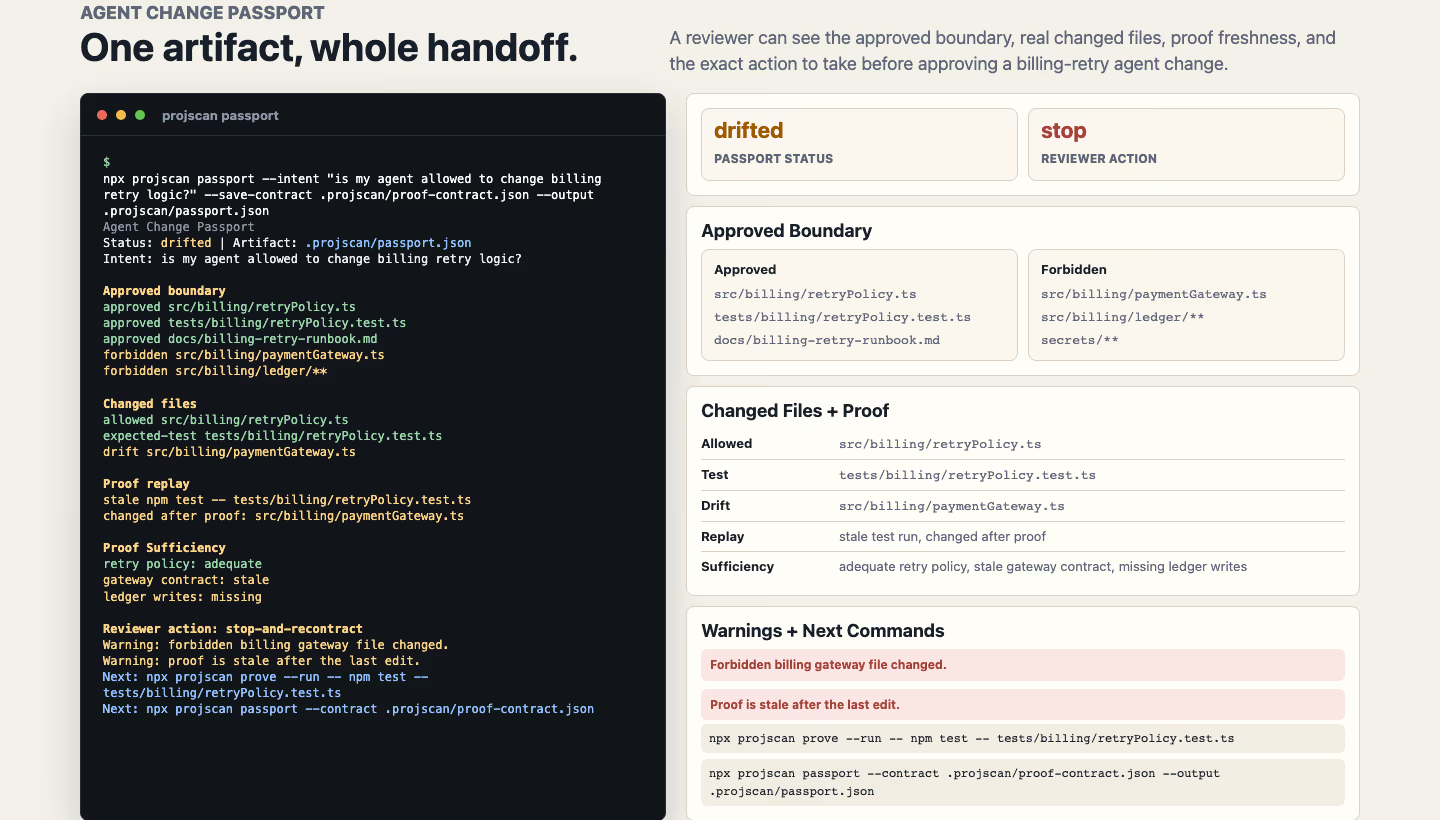
Agent Change Passport packages the approved boundary, changed files, proof replay, Proof Sufficiency, reviewer action, warnings, and next commands into one local handoff artifact.
Write the passport artifact
Save the passport under a name
Read the passport as JSON
Live Guard
Run
projscan guard is the running check that detects drift from the approved contract while an agent works. It compares the current working tree against a saved Proof Contract and tells you the moment a change leaves the approved boundary, so drift surfaces during the session instead of at review.
npx projscan guard --contract .projscan/proof-contract.json
Guard states. Guard resolves to one of four states.
| State | Meaning |
|---|---|
clear |
The working tree is inside the approved boundary. |
attention |
A change is close to the boundary or proof is going stale. Look before continuing. |
drift |
The diff left the approved boundary: it touched forbidden or out-of-scope files. |
blocked |
A required gate failed, so the change cannot proceed as is. |
Run it once for a snapshot, add --watch to re-check continuously as you edit, or add --fail-on-drift to exit non-zero in CI. projscan guard --fail-on-drift exits non-zero when the current diff leaves the approved boundary or the contract is missing, so a drifted change stops the pipeline. Guard runs locally and reads the saved contract; the package exports computeGuard() and the guard report type for programmatic use.
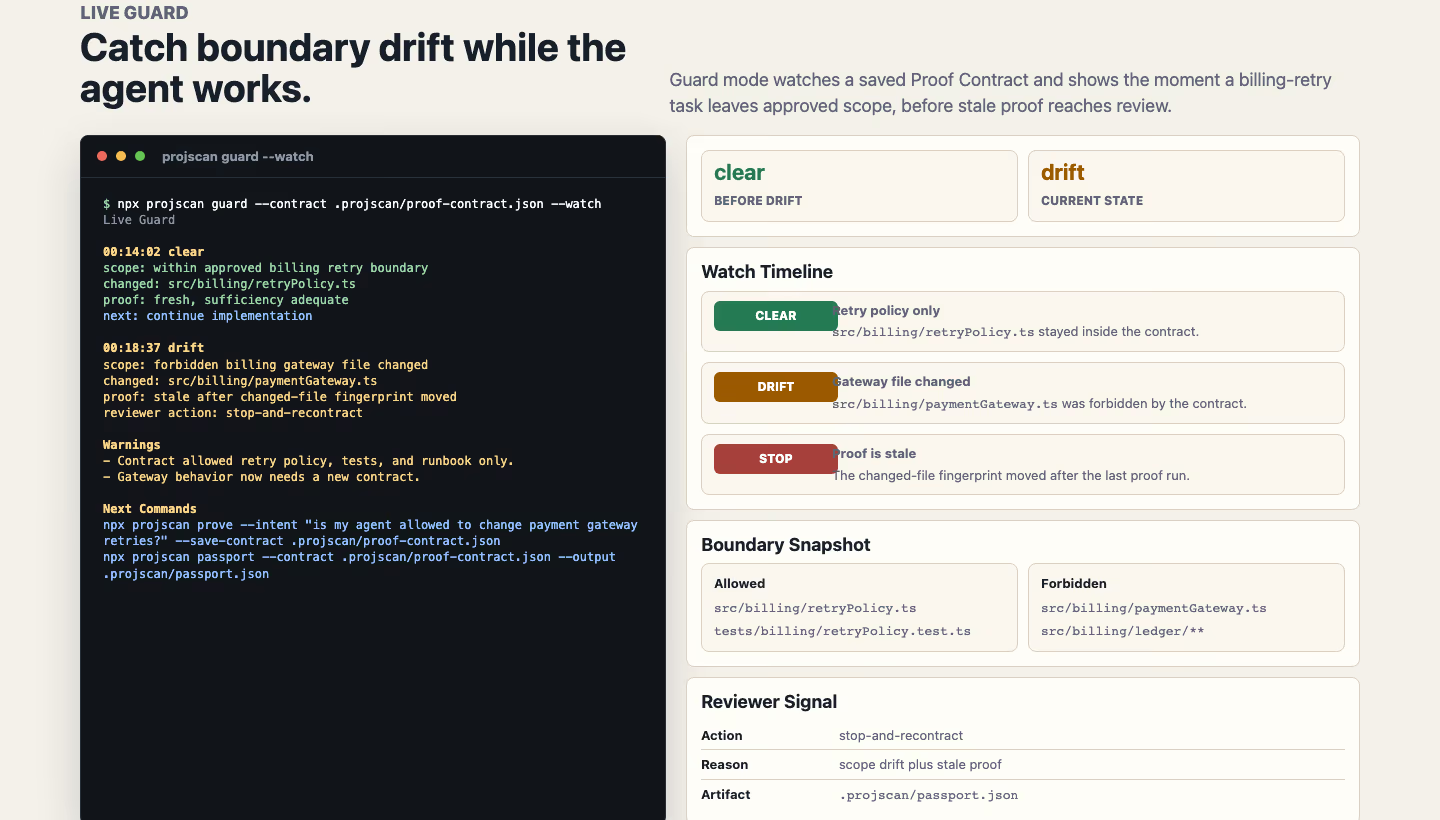
Live Guard watches the current diff against a saved Proof Contract and catches a change moving from clear to drift before review.
Watch for drift during a session
Fail CI on drift
Proof Broker and PR Passport
Run
projscan proof-broker brokers the proof a change still owes into one reviewer-ready PR comment, the PR Passport. It reads the Agent Change Passport, the Proof Contract, the Proof Receipt, Proof Sufficiency, and Team Proof Recipes, lists the required commands and reviewers, marks which proof is present, stale, or missing, and writes the comment for the pull request.
npx projscan proof-broker --contract .projscan/proof-contract.json --pr-comment
The PR Passport carries the reviewer decision, the Proof Receipt evidence, recipe gaps, required reviewers, changed-after-proof files, and a receipt fingerprint, so a reviewer reads one comment instead of reassembling the evidence. Where Review Gate returns the decision, the Proof Broker writes the reviewer-facing comment that backs it.
Explicit bootstrap. With --bootstrap-contract, the Proof Broker mints the next scoped Proof Contract only when explicitly asked, then returns bootstrap-aware PR Passport output. Without the flag it mints nothing. Like Review Gate, the Proof Broker reads evidence and never runs proof commands; produce proof in the CLI with projscan prove --run -- <command>, then the broker reads it.
Bootstrap the next contract as JSON
Broker proof into a PR comment
Agent path in 5 commands
The whole loop, start to proof, in five commands.
npx projscan start --intent "is this safe to commit?"
npx projscan start --save-mission .projscan/mission --intent "what breaks if I rename the auth token loader?"
cd .projscan/mission && ./mission.sh && ./status.sh && ./review.sh
npx projscan start --mission .projscan/mission
npx projscan mission-proof --mission .projscan/mission --format markdown
Step 1 routes a goal into a plan. Step 2 saves a runnable bundle. Step 3 runs, checks, and gates the work. Step 4 resumes start from the saved pass or fail state. Step 5 prints a paste-ready proof report for the PR or release.
Proof-first assessment
Run
projscan assess is the front door to the proof-first workflow. Give it a goal and it names the safest next change, then returns Proof Cards V2 that carry the evidence behind that call.
Each Proof Card answers a fixed set of questions: what is risky, why it is risky, what to fix first, what change shape is safest, which tests prove it, what risk the fix removes, and whether the repo is ready to ship. The card carries the local evidence and its strength, the impact, the safe change shape, the verification commands, a confidence read with the reason behind it, the evidence gaps, the ranking reasons, Trust Memory from past runs, a feedback or suppression path, a risk delta, and an AgentLoopKit-ready handoff packet, so a fix is a decision you can defend in review.
Use --mode fix-first when you want one or two trusted next actions instead of a long issue list. Point --feedback <path> at a local feedback file and ProjScan folds accepted recommendations, noisy findings, false positives, and suppressions into future ranking and confidence. Add --format json for an agent or --format markdown for a PR note. Over MCP, the same workflow is projscan_assess.
Return one or two next actions
Apply local reviewer feedback
Assess before a release
Baseframe Suite Integration v1
Run
ProjScan finds the risk before the task contract is written. ProjScan finds the risk, AgentLoopKit controls the work, and AgentFlight proves the result. For a Baseframe Suite task, ProjScan exports a stable local assessment that the other Baseframe tools read as a file, with no shared package and no shared process.
npx projscan passport --intent "Implement password reset" --task-id auth-password-reset-20260627-01 --emit-baseframe
This writes .baseframe/evidence/<task-id>/projscan-assessment.json and updates the shared workflow manifest. Pass --output <path> to also write the passport artifact to an explicit ProjScan-owned path.
Who writes what. Each tool owns its own artifacts under the shared <task-id>; ProjScan writes only its own:
- ProjScan owns
.baseframe/evidence/<task-id>/projscan-assessment.json, the repository assessment, plus its passport artifacts under.projscan/. It may also create or update the shared.baseframe/agent-workflow.jsonmanifest, writing only its own fields, using relative repository paths, and preserving existing AgentLoopKit, AgentFlight, and unknown manifest fields. - AgentLoopKit reads the ProjScan assessment and writes
.baseframe/evidence/<task-id>/agentloopkit-task.json, the task contract. - AgentFlight reads both earlier artifacts later and writes
.baseframe/evidence/<task-id>/agentflight-result.json, the review result.
Shared task IDs. A caller-supplied task ID must be filesystem-safe, and it is shared across ProjScan, AgentLoopKit, and AgentFlight, so the three tools line up on one <task-id> without importing each other.
What the assessment carries. Schema version, producer metadata, task ID, intent, generated time, repository metadata, verdict, summary, impacted areas, review focus, risks, suggested checks, and optional local artifacts.
Boundaries and safety. ProjScan depends on neither package. Artifact writes are local, atomic, task-ID validated, traversal-protected, and symlink-protected, and refuse to overwrite unrelated files. The package also exports createBaseframeAssessment() plus the Baseframe v1 assessment and workflow manifest types for programmatic use.
Simulate a proposed change
Run
projscan simulate --plan "<change plan>" predicts the blast radius of a change before anyone writes it. It is read-only: it does not edit code and it does not execute the plan.
Give it a plan in plain language and it predicts the likely files, the affected tests, the contract surfaces, the rollout steps, the proof commands to run, and the before/after risk. It then compares a few change shapes, bounded extraction, regression test first, and leaving the code unchanged, and recommends one option on risk reduction versus blast radius. Read that to decide whether a refactor is worth doing before you touch a line. The simulator only inherits quality or graph evidence when the plan matches a concrete file or symbol, so a vague plan does not borrow false confidence. In 4.12.1, short filenames, generated agent and cache paths, logs, and weak planning words no longer surface as likely touched files when the plan names no concrete repo target.
Add --format json when an agent reads the result. Over MCP, the same workflow is projscan_simulate.
Executable Proof Contracts
Run
projscan prove turns a change into proof you can replay. The daily path is start -> prove -> run -> changed, and projscan start --intent routes an agent-permission question like "is my agent allowed to change billing retry logic?" straight to projscan prove.
projscan prove --intent "<change>" writes an executable Proof Contract before anyone edits. The contract carries the allowed files, the forbidden files, the risky contracts, the likely tests, the proof commands, a safe change shape, rollback notes, confidence, evidence gaps, a Trust Memory summary, and reviewer guidance. Add --save-contract <path> to keep it on disk so a later step can check the working tree against it.
Dependency intents keep their manifests. Since 5.0.2, an intent that describes a dependency or tooling version change, for example npx projscan prove --intent "upgrade projscan to 5.0.1", puts package.json and package-lock.json in allowedFiles instead of forbiddenFiles, so an upgrade contract does not block the very files its intent must touch. Unrelated intents keep the manifests forbidden by default, so a billing-retry contract still flags a stray dependency bump as scope drift.
Harness writes read as evidence. ProjScan treats sibling Baseframe harness writes under .agentloop/ and .agentflight/ as informational harness evidence rather than scope drift. Since 5.0.2 it strips leading ./ prefixes and normalizes separators first, so it reads externally supplied changed-file paths (over MCP, or from imported proof) the same way, and it de-duplicates changed files at intake, so one harness write never counts twice. Proof Ledger matching normalizes package-runner prefixes (npx, npm exec, pnpm exec and dlx, yarn exec and dlx, bunx, node_modules/.bin), so a command you recorded one way still matches the proof required another way.
projscan prove --run -- <command...> runs an explicit local proof command with shell execution disabled (everything after -- is the command and its arguments, not a shell line). It appends an executed prove-run row to the local Proof Ledger: the source prove-run, the command, its exit code, the duration, a changed-file fingerprint, a redacted summary, and a log path. Executed proof logs stay under .projscan/proof-logs/.
projscan prove --record-command "<command>" --exit-code <code> records an outcome you already have without executing anything, so a CI log or a prior run can feed the ledger beside the executed rows. It writes the same fields and leaves you in control of what runs.
projscan prove --changed replays the saved contract and ledger against the final working tree and hands back a reviewer-ready Proof Receipt. It reports replay status and timeline events, scope drift, forbidden touches, changed-after-proof files, proof sufficiency (strong, adequate, weak, missing, stale, or failed), required reviewers, the replay command, and a receipt fingerprint, marking each gate passed, missing, failed, partial, or stale, plus the risk delta and whether the change is ready to commit. It ignores local .projscan/ proof artifacts when it measures scope drift. Add --format markdown for a PR note or --format json for an agent; verifiedWorkflow appears in the JSON for contract, run, record, and receipt modes. Over MCP an agent can create the contract, replay the diff, and record imported proof through projscan_prove; only the CLI prove --run executes local commands.
Save the contract to disk
Run a proof command
Record an outcome without running it
Emit a Proof Receipt
Proof statuses
Every Proof Receipt resolves each change to one status. Read it to know what a reviewer still owes.
| Status | Meaning |
|---|---|
verified |
Scope and proof match: the change stayed inside the contract and its proof passed. |
needs-proof |
Proof is missing, partial, or weak for the changed surface. |
stale |
Files changed after the proof ran, so the evidence no longer covers the diff. |
failed |
A required proof command failed. |
drifted |
Changed files left the contract: the diff touched forbidden or out-of-scope paths. |
verified is the only status that clears review on its own. The other four name the exact next move, and the Common fixes section below maps each one to a command.
Proof Sufficiency
A passing command is not always enough proof. Proof Sufficiency rates how well the proof covers the changed risk surface, so weak coverage is visible instead of assumed.
- strong. Proof directly exercises the changed production surface, and the commands map to the risky files in the contract.
- adequate. Proof covers the change with minor gaps that do not touch the riskiest paths.
- weak. Proof runs, but it does not exercise the changed production surface. Add or run a command that does.
- missing. No proof command ran for the changed surface.
- stale. Proof ran, then files changed after it, so the evidence is out of date. Rerun it after the last edit.
- failed. A required command exited nonzero. Fix the change or the test, then rerun.
The sufficiency rating travels with the receipt into projscan evidence-pack --pr-comment, so a reviewer sees strong, adequate, weak, missing, stale, or failed next to the diff.
Team Proof Recipes
Team Proof Recipes set a proof bar for sensitive paths. Add proofRecipes to .projscanrc.json, and a change that matches a recipe must carry the required commands and reviewers, and must avoid the forbidden files, or the receipt reports the gap.
{
  "proofRecipes": [
    {
      "id": "billing-critical",
      "matches": ["src/billing/**"],
      "requiredCommands": ["npm test -- tests/billing/retry.test.ts"],
      "requiredReviewers": ["@platform"],
      "forbiddenFiles": ["src/auth/**", "infra/**"]
    }
  ]
}
When a change touches src/billing/**, projscan prove --changed checks that the required commands ran and passed, lists @platform as a required reviewer, and flags any touched src/auth/** or infra/** file as a recipe violation. projscan evidence-pack --pr-comment surfaces the recipe gaps and required reviewers, and projscan ci can fail the build until the recipe is satisfied.
Since 5.0.2, recipe forbiddenFiles entries carry the same harness-path guard as Proof Contract forbiddenFiles, so a recipe that forbids .agentloop/** or .agentflight/** no longer flags sanctioned Baseframe harness evidence as forbidden scope drift.
Common fixes
When a receipt is not verified, map the status to the fix.
- Proof is stale. Files changed after the proof ran. Rerun
projscan prove --run -- <command>after the last edit, thenprojscan prove --changedto refresh the receipt. - Proof is weak. The command ran but did not cover the changed production surface. Add or run a command that exercises it, then prove the change again.
- Scope drifted. The diff left the contract. Move the unrelated edits out of the change, or write a new Proof Contract with
projscan prove --intent "<change>" --save-contract <path>. - MCP cannot execute proof. MCP records and replays imported proof but never runs commands. Run
projscan prove --run -- <command>from the CLI, then let the agent read the recorded result over MCP. - CI needs reviewer text. Run
npx projscan evidence-pack --pr-commentto produce the Reviewer Decision and Proof Receipt comment for the pull request.
Start with an intent
Run
projscan start is still the entry path a new agent or human follows on day one: it checks your Node.js version, Git state, package metadata, config, Tree-sitter runtime, plugins, and MCP startup. You lead with --intent "<goal>", and instead of only orienting, projscan start routes the goal into commands, proof, and handoff surfaces.
Mission Control infers the workflow from a plain-language goal, then returns an execution plan with a current cursor, route confidence, matched keywords, ready actions, alternatives, done criteria, proof commands, a review gate, and a compact handoff prompt. Deterministic intent coverage spans privacy, repo orientation, local setup, change planning, public contracts, file impact, package importers, ownership, PR evidence, release readiness, coordination, and session handoff.
Routing in brief:
- Agent-permission questions like "is my agent allowed to change billing retry logic?" route straight to
projscan prove, so the change starts with the contract that scopes it. - Safe-to-commit questions like "is this safe to commit?" route to
projscan assess --mode fix-first, withprojscan preflightkept as proof. - Repo and change questions route to
projscan understand. - Import and package questions route to
projscan semantic-graph. - PR and release questions route to
projscan evidence-pack,projscan review, or release readiness. - Failing, flaky, and build questions route to
projscan regression-plan. - Proof and testing questions route to
projscan understand --view verify. - Planning questions like "what should we build next?" or "what should we improve next?" route to bug-hunt and action planning.
Local setup discovery reads how your repo runs across Node, Python, Rust, Go, Java, Ruby, PHP, and Swift: npm scripts, lint and typecheck, e2e, Storybook, Cypress, Playwright, Docker Compose, migrations, and seed or reset commands. projscan first-run still walks the ordered onboarding path; docs/FIRST-10-MINUTES.md covers those first ten minutes.
Pick the tests to run
Trace who imports a file
Audit dependency licenses
Hand off to the next agent
Mission handoffs
Run
Hand a mission to the next agent. Pull the next move, or save the whole bundle so another agent resumes without rereading the report.
--next-command prints the next shell command for the current cursor step. --next-tool-call returns that step as compact MCP JSON (tool and args), and --proof-commands lists the remaining verification commands, one per line. --review-gate returns the stop checklist before another slice or release.
--save-mission <dir> writes a runnable bundle: a README, prompts, runbook, task card, review gate, JSON handoff files, shortcut JSON, proof logs, a run report, summary JSON, manifest metadata, and three executable scripts. Run mission.sh to execute the next steps, status.sh to report where the work stands, and review.sh to gate approval. ProjScan escapes freeform intent text in every generated command, so a stated goal stays a literal argument. Resume the whole mission later with projscan start --mission <dir>: start replays from the saved pass or fail state in proof-logs/summary.json instead of rereading the report.
Get the next MCP call
Save a runnable bundle
Run, check, and review the bundle
Resume from the saved mission
Report mission proof
Run
projscan mission-proof summarizes local Mission Control proof across one or more saved bundles, and compares it with an optional manual baseline to estimate reruns avoided, failed gates caught, and time saved. It reads bundles on your machine and never uploads source.
Use Markdown when a human reads the result: PR notes, release review, a handoff doc. Use JSON when an agent or script reads it, or when CI archives the proof. --write saves the report as a local artifact and picks the format from the file extension (.md or .json).
--latestreports the newest bundle byproof-logs/summary.json;--allrolls up.projscan/missionplus child bundles under.projscan/missions/.--list,--needs-attention, and--mission-status <status>show and filter saved bundles before you pick one.--summaryprints one status line for CI logs;--require-passedexits nonzero unless every selected bundle passed.
Gate CI on local proof
Save a proof artifact
Proof summary for scripts
Focus on bundles needing attention
AgentLoopKit and AgentFlight harness
Run
When a repo carries AgentLoopKit or AgentFlight harness files, projscan start detects them and surfaces the matching proof commands beside the mission, as read-only hints.
- AgentLoopKit files add
npm exec agentloop -- status, along with its task-contract and ship steps, to the proof and coordination hints. - AgentFlight files add
npm exec agentflight -- verify, so a session's recorded verification sits next to the mission proof.
ProjScan points at these commands; it does not run them for you. Run the harness command yourself, or let your agent run it, then report the result through projscan mission-proof with the rest of the proof. If neither harness is present, ProjScan omits the hints and the mission loop is unchanged.
Wire MCP into your client
Run
ProjScan is an MCP server that exposes 51 MCP tools across Review Gate, the Proof Broker, the Agent Change Passport, the verified change workflow, proof-first assessment, change simulation, repo understanding, graph queries, bug-hunt queues, PR evidence, trust gates, release readiness, and swarm coordination. projscan_review_gate, projscan_proof_broker, projscan_passport, projscan_prove, projscan_assess, and projscan_simulate give an agent the same proof-first workflows over MCP. Review Gate and the Proof Broker return evidence and never run local proof commands. Over MCP an agent can create a Proof Contract, replay the diff, record imported proof, and read passport evidence through projscan_passport; only the CLI prove --run executes local commands. One command wires it into Claude Code, Cursor, Codex, or all of them at once.
If the server does not appear in your client, run projscan mcp doctor --client claude (or cursor, or codex). The doctor compares the installed ProjScan against your client config and prints a corrected, paste-ready snippet. Add --format json when an agent is reading the result.
Doctor as JSON
Start the MCP server
Query the semantic graph
Run
projscan semantic-graph returns the stable v3 semantic graph: file, function, package, and symbol nodes with normalized imports, exports, definitions, and calls edges. Since 4.0 it also answers single targeted lookups through a query argument, so an agent gets one cheap answer instead of the whole graph.
Over MCP, pass { query: { direction: "importers", file: "src/auth/token.ts" } } to projscan_semantic_graph and get back every file that imports the target. Directions: imports, exports, importers, symbol_defs, and package_importers, with optional file, symbol, and limit fields. With no query, the full graph contract is what it was in 3.x.
Inspect dependencies
Run
projscan dependencies reads the dependency tree and reports what an agent or reviewer needs before a bump lands.
- License summaries and copyleft risk. Each dependency carries its declared license, and ProjScan flags copyleft obligations so you catch legal risk before a release lands.
- Installed package size. See which dependencies bloat the install, so a swap or removal is an informed call.
- Importer guidance. Pairs with
projscan semantic-graph'spackage_importerslookup to show who inside the repo imports a package, so you know the blast radius of changing or dropping it.
Add --format json when an agent is reading the result.
Migrating from 3.x
5.0.2 is a drop-in upgrade from any 4.x or 5.0.x release: dependency-intent contract scoping, harness-path normalization, and the recipe harness guard are behavior fixes inside the existing surface, with no tool removals and no schema breaks. The only tool removals ever happened in 4.0, which removed two tools deprecated in 3.8.0, each with a drop-in replacement. Everything since is additive: Mission Control intent routing, the handoff surface above, the resume-and-proof loop, Mission Proof reporting, the Agent Release Harness, the daily engineering gates, the 4.11 proof-first projscan assess and projscan simulate tools, the 4.12 Proof Cards V2 trust loop, the 4.13 Proof Replay workflow, the 4.14 verified change workflow with its executed prove --run runner, the 4.15 proof replay trust loop with richer receipts and Team Proof Recipes, the 4.16 Baseframe Suite assessment export, the 4.17 Agent Change Passport and Live Guard, the 4.18 Review Gate for AI code handoffs, and the 5.0 explicit bootstrap loops all add to the contract, with no tool removals and no schema breaks.
projscan_explain/projscan explain→projscan_file/projscan file. A strict superset: the same purpose, imports, and exports, plus risk, ownership, churn, cyclomatic complexity, and coupling.projscan_graph→projscan_semantic_graph. Use thequerymode above for single lookups; call it with noqueryfor the full graph.
The 4.0 migration guide maps every call. The rest of the surface carries over: tool names, schemas, exit codes, and the plugin contract.
Generate PR evidence
Run
On any change, projscan evidence-pack --pr-comment writes a PR comment with a Reviewer Decision, the top risks, CODEOWNERS-derived routing, the exact next commands, and what shifted from your local baseline. The Reviewer Decision has three states.
- Ship. No semantic risks above threshold, no dataflow taints, no failing preflight gates. Cosmetic and stylistic findings appear as suggestions.
- Review. Scale-only or context-dependent concerns: new hotspots, broad blast radius, dependency advisories below the configured severity, lint or coverage drift. The reviewer reads the comment; the merge does not block.
- Fix-first. Bridge-helper dataflow findings, audit findings above threshold, or any preflight gate that failed with evidence. The comment names the gate, the file, the current owner state, and the first command to run.
CODEOWNERS routing runs per changed file: which team owns it, who to flag for security review, and which packages cross ownership boundaries in a monorepo. The block list stays small. Borderline cases return Review with a manual-read note.
Shipped examples show the calibration on real PRs: a before/after comparison, a docs-only PR that stays calm, a generated-code PR, a dataflow/security PR with actual defects, and a large release that asks for manual sign-off.
Run CI for PR annotations
Run
projscan ci runs the same gate your CI runs and prints findings ready to annotate a pull request. --format json returns a finding list where each entry carries file, line, rule id, severity, message, and remediation, so a bot posts inline comments and a reviewer sees what to fix and where.
The command exits nonzero when a finding meets the configured failOn floor, so a PR blocks on real risk and stays green on noise. Pair it with projscan evidence-pack --pr-comment when you also want the Reviewer Decision summary.
Human-readable CI run
Add the PR evidence comment
Suppress one confirmed finding
When you confirm a finding is a false positive, silence that one finding instead of excluding the whole file. Both ways keep a written reason that stays in review.
Inline, on the line itself:
const apiKey = "AIza..."; // projscan-ignore-line hardcoded-secret -- public Firebase web key
Config-level, for one rule and path pair, when the finding lives in a known place:
{
  "suppressions": [
    { "rule": "hardcoded-secret", "path": "src/firebase/config.ts", "reason": "public Firebase web key" }
  ]
}
The rest of the scan stays intact, so the gate still catches the next real finding in the same file.
Tune CI failure floors
Run
failOn sets the severity floor for the gate: the build fails only when a finding is at or above it, so low-severity noise never blocks a merge. Set it in your projscan config and raise it as a codebase gets cleaner.
Severity is not fixed per rule. Override an individual rule up or down when your team weighs it differently from the default, so a rule you care about can block while a noisy one only warns.
{
  "failOn": "high",
  "rules": {
    "unused-exports": { "severity": "low" }
  }
}
Run the gate with projscan ci --format json and read the exit code: nonzero means a finding met the floor.
Read the score breakdown
Run
projscan ci --format json returns the score breakdown behind the verdict, so you see why a gate passed or failed instead of guessing.
- Base score. The starting score before any findings apply.
- Severity weights. How much each finding subtracts, scaled by its severity.
- Category penalties. Extra penalty per finding category, so a cluster of one kind of risk reads clearly.
- Final score. The base score after severity weights and category penalties, the number the gate compares against your threshold.
When a gate fails, the breakdown names the findings and categories that moved the score, so the fix is obvious.
Forward feedback into projscan
Run
projscan feedback intake turns reviewer feedback from real projects into follow-up work instead of a lost comment. It routes a note into the right bucket: a false positive, an install warning, a docs-overclaim note, or workflow-focus feedback.
Pass the note inline, or point at a Markdown file when a reviewer wrote more than a line. --format json returns the structured intake for an agent or a tracker.
Intake from a Markdown file
Roll it out across a team
Run
Once a single repo runs cleanly, three commands roll ProjScan out to the team and measure whether it helps.
projscan init team writes a starter policy file, a GitHub Actions config, CODEOWNERS hints, and a first-run onboarding guide into your repo. The generated policy is yours to edit; CI reads from it on every PR.
projscan trial and projscan dogfood produce local adoption-readiness reports covering first-run activation, dogfood coverage, feedback summary, market validation, and trust signals. The output includes proofGates and nextProofStep, so the loop tells you which proof is missing instead of asserting adoption. Run dogfood across real repos to measure whether the loop saved time.
projscan feedback captures structured reviewer feedback against the PR comment, tying claims about value to evidence. A scan only counts as "proven" after repo coverage, three or more useful responses, measured value, false-positive balance, and repeat PR feedback are all present.
projscan release-train previews the product-line roadmap: what each upcoming bump changes and which proof step it depends on. docs/ADOPTION-PROOF.md documents the measured adoption loop, proofGates and all.
Inspect adoption signals
Prove adoption across repos
Preview the Roadmap Train
Coordinate a swarm of agents
Run
When several agents work the same repo in parallel git worktrees, ProjScan keeps them from colliding. Everything here runs locally: no daemon, no cloud, no shared server.
projscan collisions reports same-file and dependency overlaps between worktrees before any branch merges, so you see where two agents are about to touch the same surface. Pass --transitive to also flag multi-hop overlaps (one worktree changes a file another worktree's change transitively imports), each with a hop distance; --max-distance bounds the walk while the one-hop default stays precise.
projscan claim holds advisory leases over files, directories, or symbols, shared across worktrees. Pass --ttl so a stale claim expires on its own instead of blocking the swarm.
projscan merge-risk returns a safe integration order and the conflict hotspots to land first. projscan route maps a stated goal to the right tool, and projscan coordinate folds collisions, claims, and merge risk into one readiness verdict: clear, caution, or conflicted.
For long-running sessions, projscan coordinate --watch --interval 30 re-evaluates on the interval and re-emits only when the state changes, as a console summary or NDJSON with --format json. Over MCP, projscan_coordinate_watch (start, stop, list) polls the in-flight worktrees and emits a notifications/projscan/coordination_changed notification on each change, so an agent reacts to other agents' work without re-asking. projscan agent-brief adds a swarm-coordination hint to coordinationHints when parallel worktrees are in flight, and projscan preflight carries a coordination evidence bucket that raises caution, never a hard block, when in-flight worktrees collide.
Cross-repo workspace reads only locally registered sibling repos from .projscan-cache/workspace.json. Each of these tools also ships over MCP (projscan_collision, projscan_claim, projscan_merge_risk, projscan_route, projscan_coordinate, projscan_coordinate_watch), so an agent can check readiness before it edits.
Detect transitive collisions
Watch coordination live
Claim a file for two hours
Get a safe merge order
Privacy and trust
ProjScan is offline by design. Nothing about your repo, your scan, or the graph it builds leaves your machine.
- No source upload. No API key. Anonymous product telemetry is off until you opt in, and the allowlist excludes source, paths, repo and branch names, package names, usernames, raw findings, and secrets.
projscan privacy-checkprints what ProjScan can read, write, or contact on this machine, including telemetry state, scan boundary,.envhandling, plugin execution, and any known network-capable endpoints.--offline(orPROJSCAN_OFFLINE=1, orscan.offline: true) blocks every network-capable surface in one flag: telemetry, npm audit, registry checks, and the optional semantic model.- Repository scanning respects Git's visible-file boundary by default.
.env*files are path-only unless you pass--scan-env-values; ignored files stay ignored unless you pass--include-ignored. - The published npm package has zero install scripts.
npm install projscanruns no ProjScan code. - Local plugins run under trust on first use. Even with
PROJSCAN_PLUGINS_PREVIEW=1, a plugin module executes only after you approve its exact bytes withprojscan plugin trust; a changed module reverts to untrusted, and approval is a CLI-only action that MCP never exposes. projscan fixinstalls dev tooling withnpm install --ignore-scripts, so applying a fix never runs the target repo's npm lifecycle scripts.- Every release ships an npm provenance attestation and a CycloneDX SBOM published as a GitHub asset. The repo maintainer verifies both against the installed tarball locally with
npm run release:check. - Semantic search uses a local ONNX model that downloads once on first use, then runs on-device.
Troubleshooting
Run
Most first-run issues land in a handful of buckets.
- MCP server not appearing in your client. Run
projscan mcp doctor --client <claude|cursor|codex>for a corrected, paste-ready config snippet. The doctor checks the installed version against your client config and outputs the exact JSON to drop in. doctorreports missing Tree-sitter parsers. The bundled parsers cover twelve named languages (eleven AST adapters) out of the box. A flagged language means the installer skipped a step or a network proxy blocked the optional dependency. Re-run install with network access and the language probe will retry.- Long scan, repeated findings. After the first run, ProjScan writes a local baseline. Later scans report only deltas. If you are seeing every old finding again, delete the baseline and rebuild it with a clean scan.
- Windows path errors. Use forward slashes in
projscan startflags, or quote paths with spaces. The CLI normalizes paths; the typical cause is shell escaping, not ProjScan. - Agent ignored the trust gate. The gate is advisory unless the client enforces it. Wire it into your team policy via
projscan init teamso CI can fail the build when the gate returns block.
For anything else, start with projscan doctor. It prints a focused health check that names the failing subsystem and the next command.
More from the studio
AgentLoopKit
The local control plane for low-token, verifiable agent loops. It owns scope, gates, and completion decisions, with a token receipt on every step.
View
AgentFlight
agentflight guard watches local trust while your coding agent works; agentflight finish writes the Review Passport that proves the result.
View
VerisKit
veris runs the test and quality tools you already have, then returns one honest verdict, verified, failed, or partial, plus a PR-ready report.
View