AgentFlight / Docs
Get started fast.
AgentFlight is a local-first review layer for coding-agent sessions. Run it around Codex, Claude Code, Cursor, or any coding agent. `agentflight guard` watches the local trust state while the agent works, readiness, proof gaps, scope drift, and Baseframe gates, with one next action; `agentflight verify` captures proof; and when the work is ready, `agentflight finish` writes one Review Passport, JSON and Markdown, that tells reviewers whether the work is ready. Guard is the live monitor, finish is the final evidence. This guide takes you from install through `guard` to your first Review Passport in under ten minutes, then explains the Project Review Contract, the Review Contract, and the Baseframe Suite workflow that links AgentFlight to ProjScan and AgentLoopKit. Everything lives under `.agentflight/` and `.baseframe/` in your repo. Nothing uploads, and AgentFlight never calls an LLM.
Quickstart
Get from an empty repo to your first Review Passport in under ten minutes.
Prerequisites: Node.js 20 or newer, a git repository, and npm / npx. No account, no API key, no install script.
1. Confirm the version.
npx --yes agentflight@latest --version
# Expected: 0.16.1
2. Run the golden path. From the repo root, init once, start the session, keep Guard beside the agent, capture proof, snapshot the milestone, and finish.
agentflight init
agentflight start --task "Add password reset flow"
agentflight guard --once
agentflight verify -- npm run typecheck
agentflight verify -- npm test -- auth
agentflight snapshot --note "Implementation complete"
agentflight finish
What each step does. init writes a local .agentflight/ directory and nothing else. start opens a session for the work. Run your coding agent normally, Codex, Claude Code, Cursor, or any other; AgentFlight records around it and does not drive the agent or edit your code. guard watches the local trust state while the agent works, so you see readiness, proof gaps, and one next action live; guard --once prints a single summary and exits. verify captures proof with checks your project already runs. snapshot records a checkpoint. finish writes the Review Passport (JSON and Markdown) plus the handoff, report, replay, and resume, then prints the artifact paths and the next action.
That is the whole loop: init once per repo, then start, keep guard open, verify, snapshot, finish per unit of work. agentflight handoff is still available when you want a lighter packet, and agentflight history --limit 1 reopens the latest one.
Confirm the version
Initialize in a repo
Start a session
Watch local trust
Capture proof
Write the Review Passport
agentflight guard
Run
Watch the local trust state while an agent works. Guard is the live monitor: it shows readiness, changed files, verification counts, proof gaps, scope drift, Baseframe gates, the trust signals worth acting on, and one next action.
agentflight guard                      # live watch, refreshes on an interval
agentflight guard --once               # print one summary and exit
agentflight guard --format json --once # structured summary for tooling
agentflight guard --interval 5000      # watch, refresh every 5s
agentflight guard --no-clear           # do not clear the terminal between updates
Guard reads the same local evidence as agentflight status. It does not run verification commands and sends nothing anywhere. Use agentflight verify to capture proof, and Guard reflects it on the next refresh.
Exit codes (one-shot). guard --once exits 0 only when readiness is ready_for_review or clean_worktree. It exits 1 for failed, missing, incomplete, stale, or unresolved trust states, so you can gate a loop or a pre-finish check on it.
A single summary looks like this:
AgentFlight guard

Task:
Add password reset flow

Trust state:
Needs verification

Changed files:
2

Verification:
0 passed, 0 failed

Finish targets:
- Review Passport JSON: .agentflight/reports/<session-id>-review-passport.json
- Review Passport Markdown: .agentflight/reports/<session-id>-review-passport.md

Trust signals:
- blocking - Sensitive auth, payment, or security files changed without passing test evidence.
  Files: src/auth/passwordReset.ts
  Suggested proof: agentflight verify -- npm test
- warning - Frontend files changed without passing build or test evidence.
  Files: components/ResetForm.tsx
  Suggested proof: agentflight verify -- npm test

Next action:
Run agentflight verify -- npm test

Local only: no upload, no telemetry, no automatic PR comment.
In a Baseframe session the summary adds a Finish targets line for .baseframe/evidence/<task-id>/agentflight-result.json and a Baseframe block with the task id, gate counts, and scope drift. The --format json summary carries the same signals as a structured object: readiness, changedFiles, verification, artifactHints (the Review Passport and Baseframe result paths), and baseframe.gateCounts.
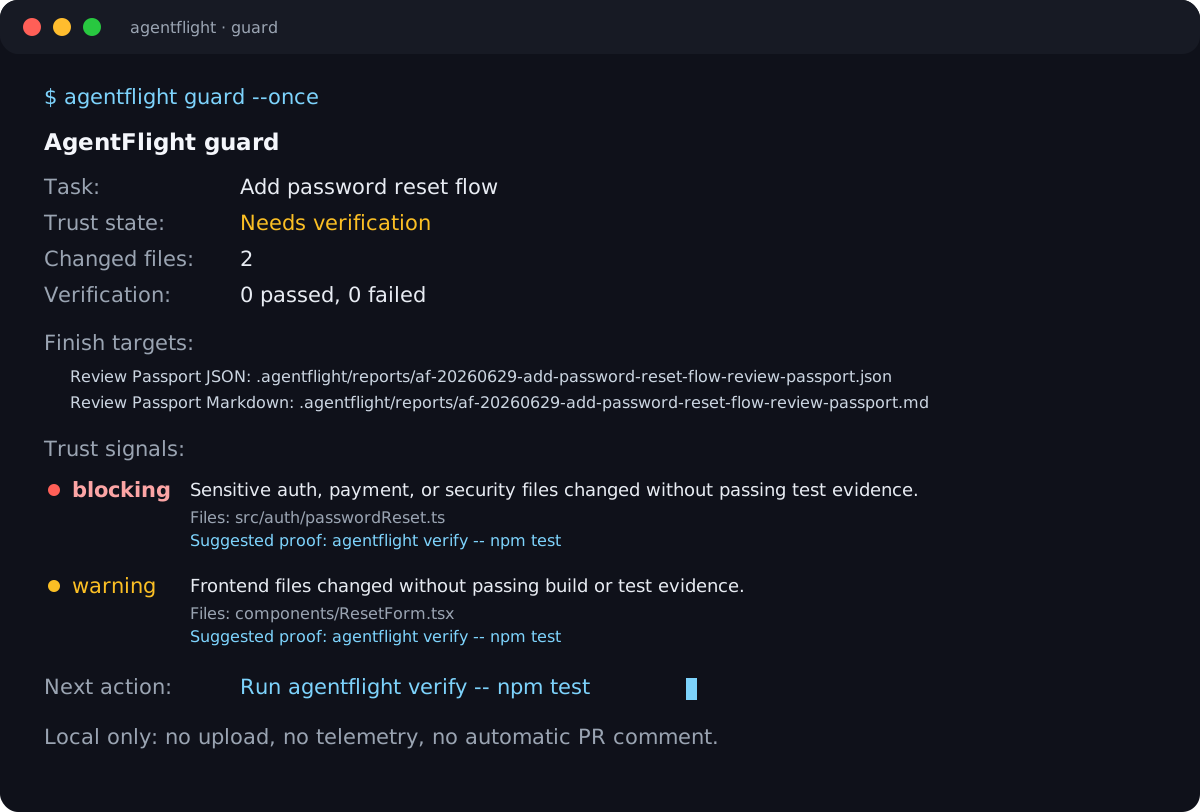
Real agentflight guard --once output: an auth file and a frontend file changed with no proof yet, so Guard holds the work at needs verification and names the next action.
Watch local trust
One-shot summary
JSON for tooling
Review Passport
Run
Guard is the live monitor; agentflight finish writes the final Review Passport. Run finish when the work needs a final local review packet. AgentFlight writes .agentflight/reports/<session-id>-review-passport.json and .agentflight/reports/<session-id>-review-passport.md, then prints the artifacts and the next action. The passport stores source-free metadata only: paths, commands, statuses, counts, timestamps, artifact paths, and hashes.
The passport carries readiness, changed files, verification runs, proof gaps, review focus, reviewer routes, artifact paths, and integrity fingerprints, so a reviewer reads one file to decide whether the work is ready. In a Baseframe session, finish also writes .baseframe/evidence/<task-id>/agentflight-result.json for AgentLoopKit to reconcile.
AgentFlight finish

Readiness:
Blocked by failed verification

Changed files:
3

Verification:
1 passed, 1 failed

Review Passport:
- JSON: .agentflight/reports/<session-id>-review-passport.json
- Markdown: .agentflight/reports/<session-id>-review-passport.md

Artifacts:
- Handoff: .agentflight/reports/<session-id>-handoff.md
- Report: .agentflight/reports/<session-id>-proof.md
- Replay: .agentflight/reports/<session-id>-replay.html
- Resume: .agentflight/reports/<session-id>-resume.md
- Baseframe result: .baseframe/evidence/<task-id>/agentflight-result.json

Next action:
Fix the failed command, then rerun agentflight verify -- npm test -- auth
agentflight handoff remains available for a lighter packet; finish is the command when you want the Review Passport and the full artifact set in one step.
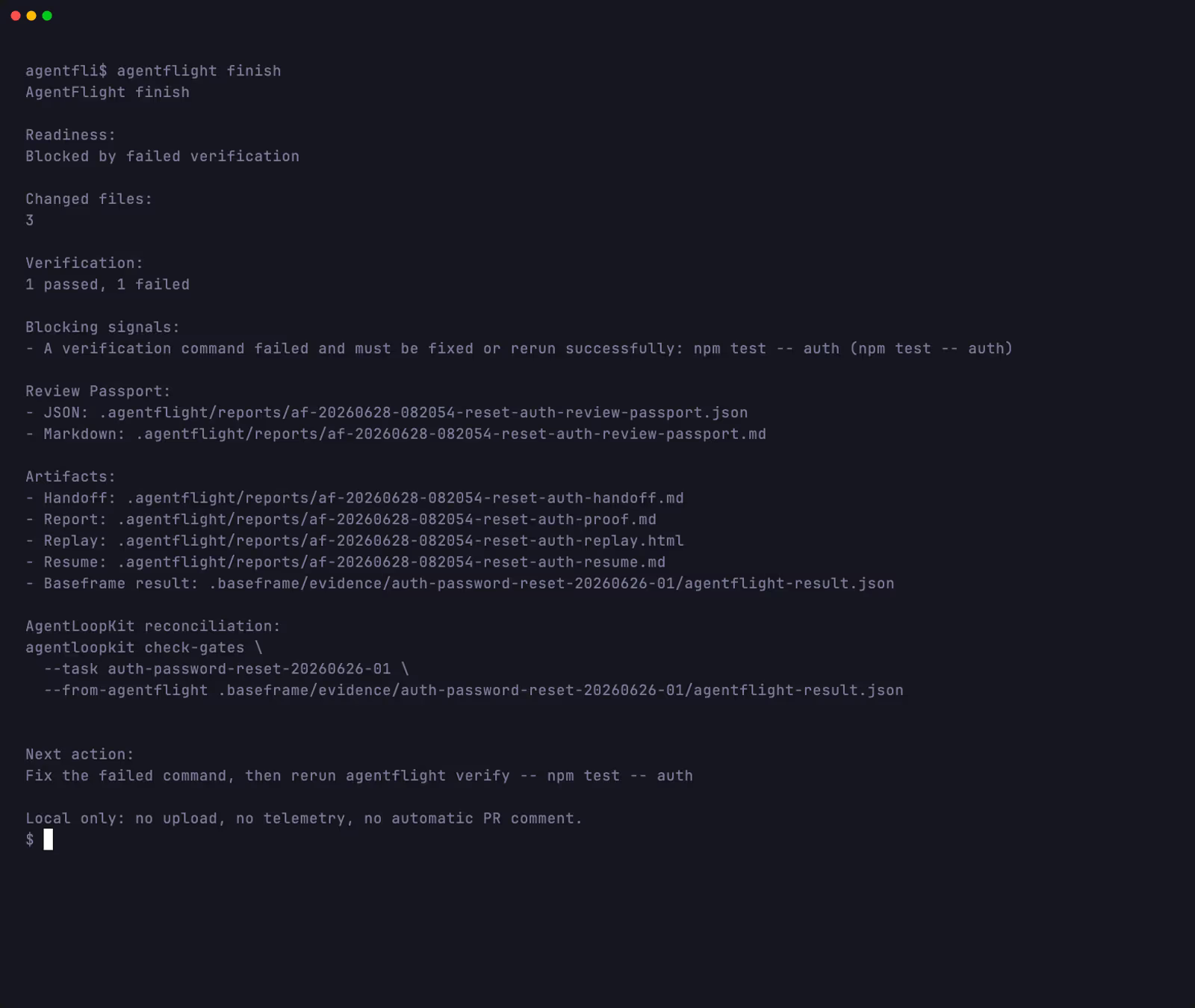
Real agentflight finish output from a Baseframe fixture: blocked readiness, the Review Passport JSON and Markdown paths, the handoff, report, replay, and resume paths, the Baseframe result path, and one next action.
Write the Review Passport
Reopen the latest packet
What to commit
init keeps your repo clean. The only file worth committing is your project config; everything else is runtime data that stays git-ignored.
Commit .agentflight/config.json if you want shared project defaults, including your Project Review Contract. init leaves it visible for exactly this reason.
Leave the runtime paths ignored. init writes a .agentflight/.gitignore so these never enter git:
.agentflight/sessions/
.agentflight/reports/
.agentflight/current/
.agentflight/evidence/
Filter tool noise. If .projscan-memory/memory.json appears and adds review noise, ignore it in .agentflight/config.json so it never reads as risk:
{
  "changedFileFilters": {
    "ignore": [".projscan-memory/**"]
  }
}
AgentFlight already filters its own .agentflight/ runtime artifacts out of changed-file review, so its output never shows up as risk. It suggests the ProjScan-memory filter when it notices that directory, but it does not hardcode the path.
Normal workflow
After init, every session follows the same short loop.
- Start a session:
agentflight start --task "...". - Let the coding agent work. AgentFlight records around it.
- Watch trust with
agentflight guardopen beside the agent: readiness, proof gaps, scope drift, and one next action, live. Useguard --oncefor a single summary. - Capture proof with one or more
agentflight verify -- <command>runs. Guard reflects each result on its next refresh. - Snapshot the milestone with
agentflight snapshot --note "...". - Finish with
agentflight finishwhen Guard reads ready. It writes the Review Passport plus the handoff, report, replay, and resume. Share the passport first.agentflight handoffstays available when you want a lighter packet. - Resume later with
agentflight resume, or reopen the latest artifact withagentflight history --limit 1.
You run init once per repo. The rest repeats per unit of work. agentflight status gives the same readiness read as Guard when you want a one-off check rather than a live monitor.
Watch local trust
Resume a session later
Failed verification example
Run
When a verification command fails, AgentFlight does not hide it. Say a test run breaks:
npx --yes agentflight@latest verify -- npm test
Four things happen:
- A short excerpt prints inline, so you see what broke without opening a log. The excerpt prefers
stderrand falls back tostdout. - The report and replay reuse the same excerpt, so the terminal, the Markdown report, and the HTML replay all show the same failure.
- Raw output stays preserved under
.agentflight/evidence/. The excerpt is a convenience, not a replacement for the fullstdoutandstderrfiles. - Readiness drops to blocked until you fix the cause and rerun a passing check. AgentFlight never reports a test as passed unless the command passed.
An interrupted run counts as incomplete: it becomes a blocking proof gap and names the command to rerun.
Proof gap:
Verification was started but no completed result was recorded: npm test

Next action:
agentflight verify -- npm test
Project Review Contract
The repo's local proof standard. It is repo-specific and lives in .agentflight/config.json, so each project decides what counts as enough proof.
What it maps. Changed-file categories to the proof each one expects: source, tests, docs, config, dependencies, public API, generated files, and manual-review areas. init ships a default baseline covering auth, security, and payment, database, backend and API, dependency, config and CI, frontend, source, tests, docs, and AgentFlight config changes.
What it answers. For the change in front of you: required proof, actual proof, stale proof, failed proof, missing proof, and manual review. For each requirement it explains why the rule matched, names the accepted proof kinds, and shows which command satisfied it.
How to edit it safely. Open .agentflight/config.json, adjust the rules for your repo, and commit it so the team shares one standard. Start from the default baseline and tighten one category at a time. The contract reads paths and proof status locally and uploads nothing.
Review Contract
Run
The session's claim ledger. Where the Project Review Contract sets the bar, the Review Contract shows how this session measured up. AgentFlight turns the session's task, changed-file, proof-gap, and readiness signals into explicit claims and marks each one:
- supported: a passed verification command backs the claim.
- needs review: a reviewer should look; no proof decides it.
- failed: a verification command for the claim failed.
- stale: the proof predates a later change to the file.
- missing or unsupported: the claim has no proof behind it.
- not testable: the change has no automated check that applies.
- unknown: AgentFlight has no signal either way.
Claims lead with the Project Review Contract requirements that matched the change, then the file-level claims, so you read the expectation before the result. Each claim points to local proof references: the changed files behind it, its proof status, any proof gaps, the readiness reason, or the command to run next. A reviewer follows the reference to the proof instead of trusting a summary.
The Review Contract is not a separate command. It appears in status, report, replay, resume, and handoff, built locally with no cloud call and no model-based extraction.
Review Contract:
- Task: supported
- Changed files: supported
- Verification: supported
- Proof gaps: none
- Readiness: ready for review
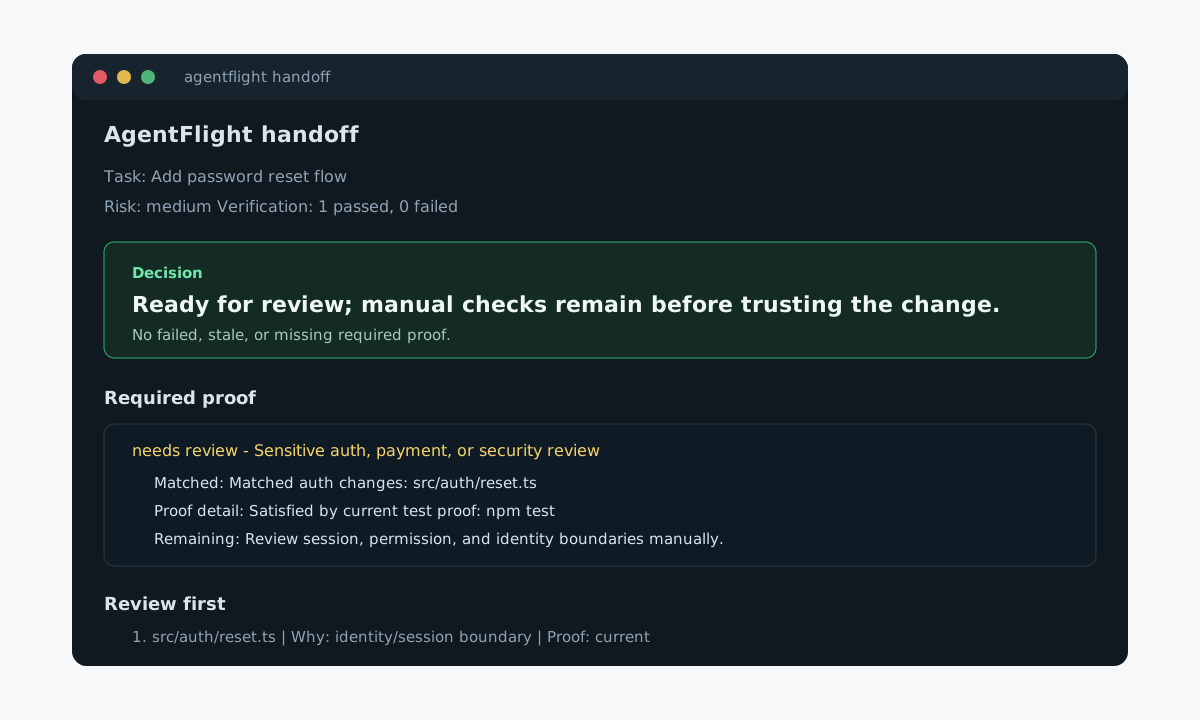
The handoff leads with the decision and why, then the required proof and the files to review first.
v0.13.0 review workflow
Run
0.13.0 adds a review layer on top of the proof AgentFlight already captures. None of it adds a new command; it shows up in the surfaces you already read.
- Trust Delta. What changed in the trust state: failed proof, stale proof, missing proof, manual review, and repo-history under-proofing, read from existing local metadata.
- Review Queue. One ordered list of what to inspect or rerun first: proof reruns, missing-proof commands, manual checks, repo-calibration guidance, and file inspection.
- Review Receipts.
agentflight handoff --acceptrecords a local review receipt. It reads current until an unresolved verification failure or a new changed file lands after acceptance, then goes stale, so an accepted handoff cannot drift unnoticed. - Role-aware routing. Maintainer, Verification, Docs/DX, Security, and Release reviewers each get their own local review path across status, the handoff, the report, the replay, and resume.
- Repo-calibrated proof guidance. AgentFlight compares this session's proof with recent local ready handoffs and accepted receipts for similar changes. When similar work usually carried stronger proof, it suggests the missing command. Suggestion-only, local, and based on bounded session metadata, never historical logs, source, or full diffs.
Review focus and changed-file lists now cap noisy output and mark when rows are capped, with a remaining count, and keep the full detail in the report and replay.
Baseframe Suite workflow
AgentFlight implements Baseframe Suite Integration v1. ProjScan, AgentLoopKit, and AgentFlight share versioned JSON evidence under .baseframe/, so each tool reads the previous one's output as a file and writes its own. The link is file-based: AgentFlight stays independently usable and does not import ProjScan or AgentLoopKit internals.
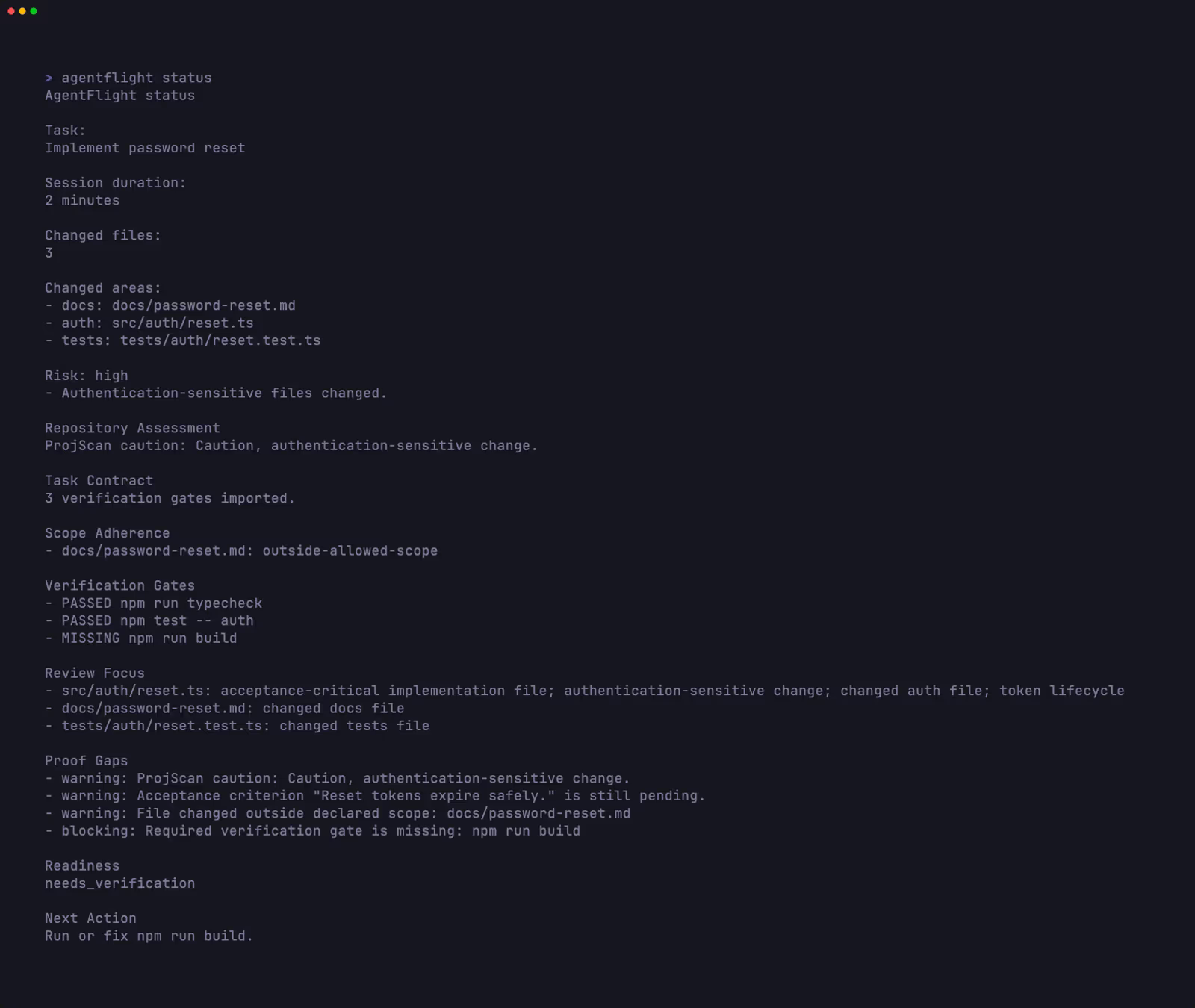
Real AgentFlight Baseframe status output showing ProjScan repository risk, AgentLoopKit verification gates, scope drift, proof gaps, readiness, and next action.
The roles.
- ProjScan assesses repository context and risk.
- AgentLoopKit defines scope, acceptance criteria, and verification gates.
- AgentFlight records execution, captures proof, detects drift, reconciles gates, computes readiness, and writes the final result artifact.
The end-to-end loop.
projscan passport \
  --intent "Implement password reset" \
  --task-id auth-password-reset-20260627-01 \
  --emit-baseframe

agentloopkit create-task \
  --from-projscan .baseframe/evidence/auth-password-reset-20260627-01/projscan-assessment.json

agentflight start \
  --from-task .baseframe/evidence/auth-password-reset-20260627-01/agentloopkit-task.json

agentflight guard --once
agentflight verify -- npm run typecheck
agentflight verify -- npm test -- auth
agentflight guard --once

agentflight snapshot --note "Implementation complete"
agentflight finish

agentloopkit check-gates \
  --task auth-password-reset-20260627-01 \
  --from-agentflight .baseframe/evidence/auth-password-reset-20260627-01/agentflight-result.json
Starting from a task contract resolves the linked ProjScan assessment through sourceAssessment.path, with no second flag.
Explicit input mode. Name both artifacts to bypass linked resolution:
agentflight start \
  --task-id auth-password-reset-20260627-01 \
  --from-task .baseframe/evidence/auth-password-reset-20260627-01/agentloopkit-task.json \
  --from-projscan .baseframe/evidence/auth-password-reset-20260627-01/projscan-assessment.json
Start from a task contract
Finish the session
Suite result artifact
Run
In a Baseframe session, agentflight finish writes the suite result artifact:
.baseframe/evidence/<task-id>/agentflight-result.json
It records:
- readiness: the single ready, needs verification, or blocked call for the session.
- changed files: the files the session touched.
- scope drift: files that fell outside the task's allowed or excluded paths.
- verification runs: each captured command with its pass or fail result.
- gate statuses: each required verification gate as satisfied, failed, or missing.
- proof gaps: required proof that is missing, stale, or incomplete.
- review focus: the ranked files to review first.
- generated artifacts: the AgentFlight Review Passport, report, replay, resume, and handoff paths.
Finish also updates the agentflight status in .baseframe/agent-workflow.json, so AgentLoopKit can reconcile the task with agentloopkit check-gates --from-agentflight. The artifact is versioned local JSON: no cloud, no telemetry, no source upload.
Baseframe session output
For Baseframe sessions, status, report, replay, and resume render the suite signals as separated sections, so you read each part of the contract on its own:
Repository Assessment
Task Contract
Scope Adherence
Verification Gates
Review Focus
Proof Gaps
Readiness
Next Action
Outside a Baseframe session, these surfaces render as before. The Baseframe sections appear only when .baseframe/ evidence is present.
Troubleshooting
Common situations and the fix.
- "doctor says no current session." Start one:
agentflight start --task "...".doctorchecks Node, npm, git, your package manager, config, writable paths, and the active session. - "status says needs verification." Run the command status suggests, usually
agentflight verify -- npm test. Readiness clears once the proof passes. - "handoff exits non-zero." Proof is missing or failed. Run
agentflight statusto see the gap, capture the proof, then hand off again. - "monorepo has no root test script." Put your verification commands in
.agentflight/config.json.doctortreats configured commands as satisfying proof-command setup, so it stops warning about a missing root script. - "generated tool files show up in review." Add their glob to
changedFileFilters.ignorein.agentflight/config.json, for example".projscan-memory/**". - "
npxseems to run an old version." Check what npm has withnpm view agentflight version, then usenpx --yes agentflight@latestto force the newest published build.
Check local setup
Check the published version
Command reference
The full surface, compact.
initwrites the local.agentflight/directory and a default Project Review Contract. Run once per repo.start --task "..."opens a session with task, branch, commit, dirty state, package manager, and detected tools. It also stores configured verification commands when present.guardwatches the local trust state while the agent works: readiness, changed files, verification counts, proof gaps, scope drift, Baseframe gates, trust signals, and one next action.--onceprints one summary and exits,--format jsonemits a structured summary,--interval <ms>sets the watch cadence, and--no-clearkeeps history in the terminal. One-shot exits 0 only when readiness is ready for review or a clean worktree. It reads the same evidence asstatusand runs no verification commands.verify -- <command>runs a proof command and records the command, timing, exit code, pass or fail, and the stdout and stderr paths. With no command, it runs the checks in.agentflight/config.json.statusranks where to review first, lists proof and proof gaps, shows the Trust Delta and review queue, and reports ready, needs verification, or blocked.finishwrites the Review Passport (JSON and Markdown) plus the handoff, report, replay, and resume, then prints the artifact paths and the next action. In a Baseframe session it also writesagentflight-result.json. The end-of-session command.handoffbundles report, replay, and resume into one lighter local packet and leads with a decision.--acceptrecords a review receipt.reportwrites a Markdown proof report.replaywrites a self-contained HTML evidence ledger.resumewrites a Codex or Claude-ready continuation prompt with state, proof gaps, next action, and guardrails.historylists recent local sessions and their artifacts.--limit 1reopens the latest; filter with--taskand--state.doctorchecks your environment and the active session.
Everything is local and read-mostly. AgentFlight runs your verification commands only when you invoke verify or a configured command.
How it works locally
AgentFlight sits between your coding agent and your review decision, and everything in the middle runs on your machine:
Your coding agent / app
  (Codex, Claude Code, Cursor, LangChain, Agno, Strands, your own code...)
       │   prompts · tool outputs · logs · files · verification
       ▼
┌────────────────────────────────────────────────────────┐
│ AgentFlight                                             │
│ runs locally — your source and evidence stay with you   │
│                                                        │
│ Session Recorder → Verification Evidence → Review       │
│                         │               Contract        │
│                         ├─ failure excerpts             │
│                         ├─ proof freshness              │
│                         ├─ required proof               │
│                         └─ claim-to-proof references    │
│                                                        │
│ report · replay · resume · handoff · history            │
└────────────────────────────────────────────────────────┘
       │   local review artifact
       ▼
Engineer review / release decision
init creates a .agentflight/ directory in your repo:
config.jsonholds local-first project settings, and is not git-ignored, so you can commit your defaults.sessions/holds session metadata and the events timeline.current/holds the active session, handoff, and resume prompt.reports/holds Markdown proof reports, HTML replays, and session handoff and resume artifacts.evidence/holds stdout and stderr from captured verification runs.
Runtime data under sessions/, current/, reports/, and evidence/ is git-ignored by default. Reports include filenames and summaries, not full source diffs.
Safety and trust
AgentFlight stays local. It records paths, commands, statuses, timestamps, counts, artifact paths, and hashes. It does not upload source, send telemetry, post PR comments, or run hidden verification commands. The detail:
- No telemetry, no login, no cloud sync, no source upload, and no automatic PR comments.
- No LLM calls and no source analysis by an external service. AgentFlight records and reports. It does not generate code.
- Guard and verification commands run only when you invoke them or a configured command. Guard reads local evidence and runs nothing in the background.
- It reads git status and package metadata and writes its own artifacts under
.agentflight/. It does not edit your source. - Reports include filenames and summaries by default, not full code diffs.
- Review Contract proof references stay source-free and local. They use paths, proof statuses, proof-gap IDs, readiness reasons, and suggested commands, not source uploads.
- Apache-2.0 licensed. Any
upgrade,license, orloginsubcommand is an inert placeholder: there is no cloud account, no billing, and no login.
More from the studio
ProjScan
ProjScan tells reviewers when to bootstrap, prove, or stop. Review Gate returns one decision; bootstrap is explicit. Local proof, no code upload.
View
AgentLoopKit
The local control plane for low-token, verifiable agent loops. It owns scope, gates, and completion decisions, with a token receipt on every step.
View
VerisKit
veris runs the test and quality tools you already have, then returns one honest verdict, verified, failed, or partial, plus a PR-ready report.
View