
CampaignPacks
Your AI marketing agency, review-first.
- Platform
- Web
- Pricing
- Free during early access
CampaignPacks
Marketing
Overview
- Status
- Early access
- Category
- Marketing
- Platform
- Web
- Version
- 0.1.0
- Access
- Invite only, public example
- Export
- Canva, one-pager, Markdown, text, JSON, CSV, .ics
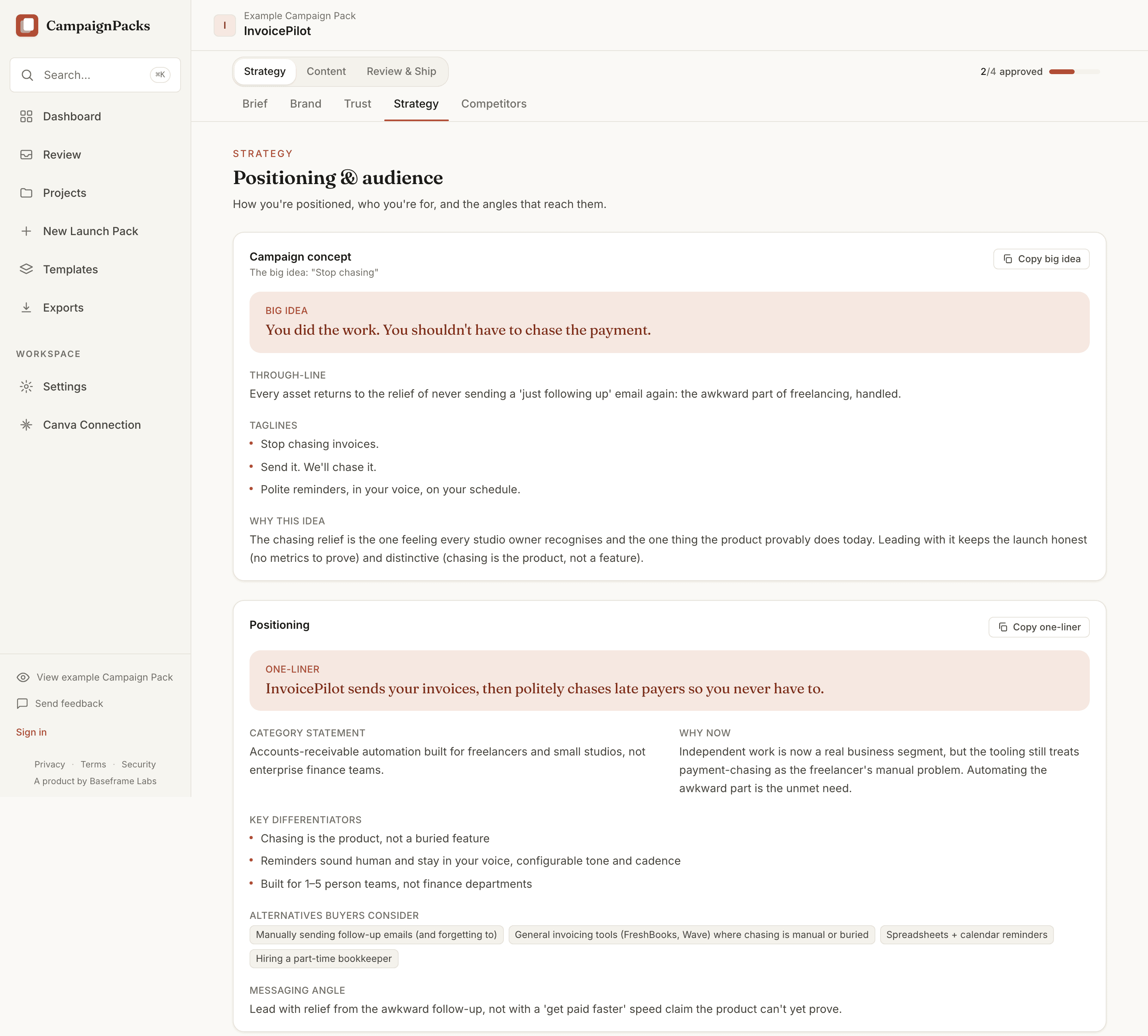
Most marketing tools write a caption and stop. CampaignPacks runs the whole engagement. Give it a website URL or a plain-text brief and sixteen marketing playbooks run in order, from analysing the offer to writing the executive summary. It returns a Launch Pack of seventeen sections on one Campaign Board, grouped into three phases: Strategy, Content, and Review & Ship.
It is review-first by design. Every asset arrives with quality scores, the rationale behind each score, and warnings that link to the section needing the fix. CampaignPacks names missing proof rather than inventing it: no fabricated metrics, no borrowed testimonials. The trust report lists each gap with a time estimate for closing it.
CampaignPacks is an agency operating system. It never schedules, queues, or emails on your behalf, and nothing goes out until you press the button on that item. When you publish, it posts to your own connected Facebook Page or Instagram with your own credentials, and it creates Meta ads paused, at a daily budget you confirm. Your AI keys stay encrypted at rest. Read a complete pack in the public example, no signup.
Walkthrough
How it works.
- 01
Paste a URL or a brief
Give CampaignPacks a website URL or write a plain-text brief. It ingests the site and analyses what you sell, to whom, and how you say it.
- 02
Sixteen playbooks run
They run in order, from analysing the offer to writing the executive summary, so the calendar and the copy inherit the positioning instead of guessing at it. The diagram below names all sixteen.
- 03
Review on the Campaign Board
The Launch Pack lands on the Campaign Board: seventeen sections grouped into Strategy, Content, and Review & Ship. Every asset carries quality scores and honest warnings, so you review with the full picture.
- 04
Approve asset by asset
Approve each asset on its own terms. Nothing reaches Canva, your Facebook Page, or an ad account without your sign-off.
- 05
Export or publish
Take the pack to Canva, a client one-pager, Markdown, copy-ready text, JSON, CSV, or an .ics calendar, or publish approved items to your own Meta accounts.
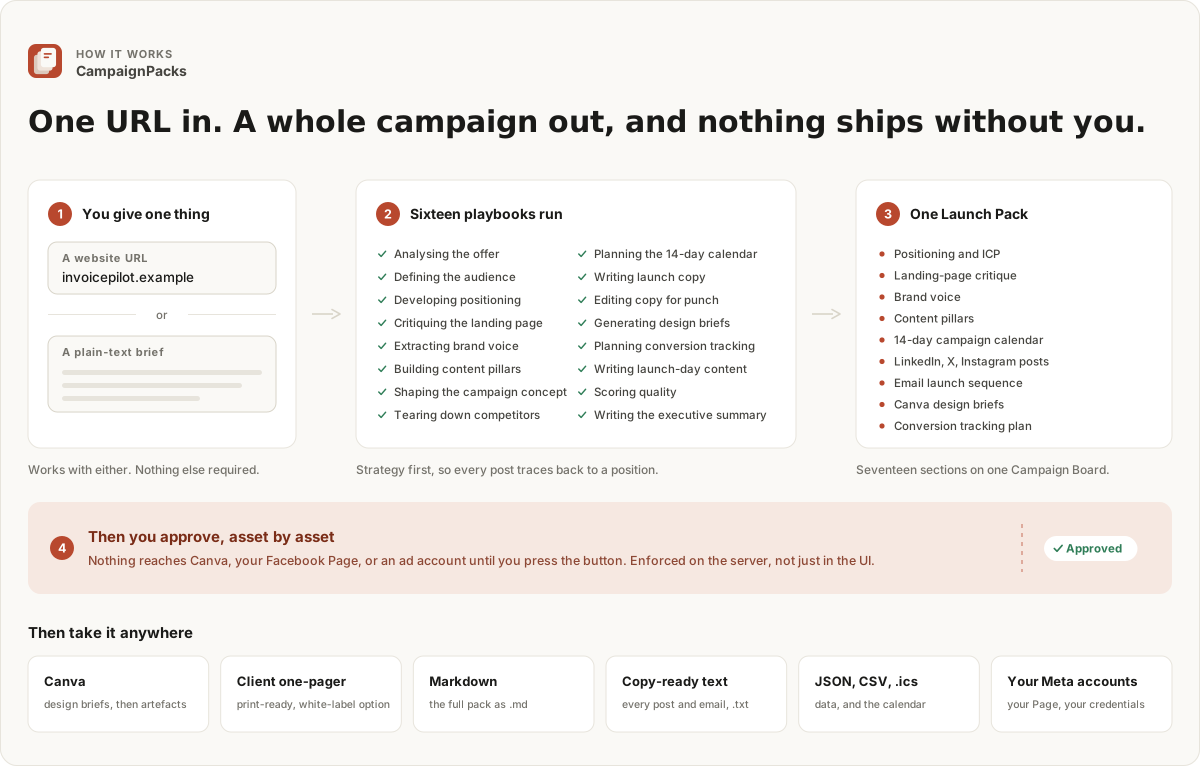
Sixteen playbooks, then one gate
Nothing reaches Canva, your Facebook Page, or an ad account until you approve that asset. The server holds the gate, so the approval is real rather than a hidden button.
Features
What it does well.
Strategy first
04- Positioning and ICP
- Every campaign starts from a named audience: positioning, an ideal customer profile, and offer analysis, so each asset traces back to who it is for.
- Landing-page critique
- CampaignPacks reads your live site and returns a specific critique of the landing page, not generic best-practice advice.
- Brand voice and pillars
- It derives a brand voice and a set of content pillars from your own material, then holds every asset to them.
- Competitive teardown
- A teardown of the alternatives your buyers consider: how each one positions, where it is weak, and the angle left open for you.
The Launch Pack
06- 14-day campaign calendar
- A dated, 14-day launch calendar sequences the whole push, channel by channel, so the pack is a plan and not a pile of posts.
- Social posts
- Ready-to-review posts for LinkedIn, X, and Instagram, written to the brand voice and mapped to the calendar.
- Email launch sequence
- A full email launch sequence, staged across the two weeks alongside the social calendar.
- Launch-day copy
- Launch-day content written for Product Hunt and Indie Hackers, ready before the day arrives.
- Conversion tracking setup
- A tracking plan that names the events worth measuring and where they fire, so the campaign is measurable from day one.
- Canva design briefs
- Design briefs written for Canva, so the visual work starts from a clear spec rather than a blank page.
Review-first
04- Asset approval queue
- Design assets queue up with approve and reject buttons and a plain status: approved, needs review, or draft.
- Quality scores with rationale
- Nine scores, from specificity to design-brief usefulness, each carrying the reasoning behind the number rather than a bare percentage.
- Rehearsal and revisions
- Walk the launch before launch day, and keep every draft: each asset holds its revision history so you can compare and restore.
- Gated on the server
- The server checks approval before it creates or publishes anything. Nothing is built until you say so.
Honest by construction
02- No invented proof
- Metrics, testimonials, and customer counts are never invented. Claims are flagged as missing proof, vague, or weak instead of being papered over.
- Client review links
- Share a pack with a client or stakeholder through a link with comment threads, and collect the feedback in one place.
Trust and control
04- Your keys, encrypted
- You bring your own AI keys, encrypted at rest with AES-256-GCM.
- It never acts on its own
- CampaignPacks never schedules, queues, or emails on your behalf. Nothing goes out until you press the button on that item.
- Your accounts, your credentials
- Publishing runs through your own connected Facebook Page and Instagram, and Meta ads are always created paused with a daily budget you confirm.
- Ad performance in the pack
- Once an ad is live, you read its performance beside the campaign you approved instead of in a separate dashboard.
The review screen
Nothing ships until you approve it.
You spend your time on the review screen. It puts the queue, the scores, and the reasoning in one view, so approving an asset is a judgement you can make.
- An overall read, in one line
- A single quality score sits beside the queue with an honest one-line summary of the launch, including the main gap still open.
- Nine scores with their reasoning
- Specificity, strategic fit, audience clarity, channel fit, credibility, non-generic language, unsupported claims, CTA clarity, and design-brief usefulness, each with the rationale behind the number.
- Warnings that point at the fix
- Every quality warning links to the section that needs fixing, so a note about weak credibility takes you to the section that caused it.
- Sending work back
- Rejecting is reversible, and 'Request changes' sends any post or email back from its own tab, so a rewrite costs you a click rather than a regeneration.
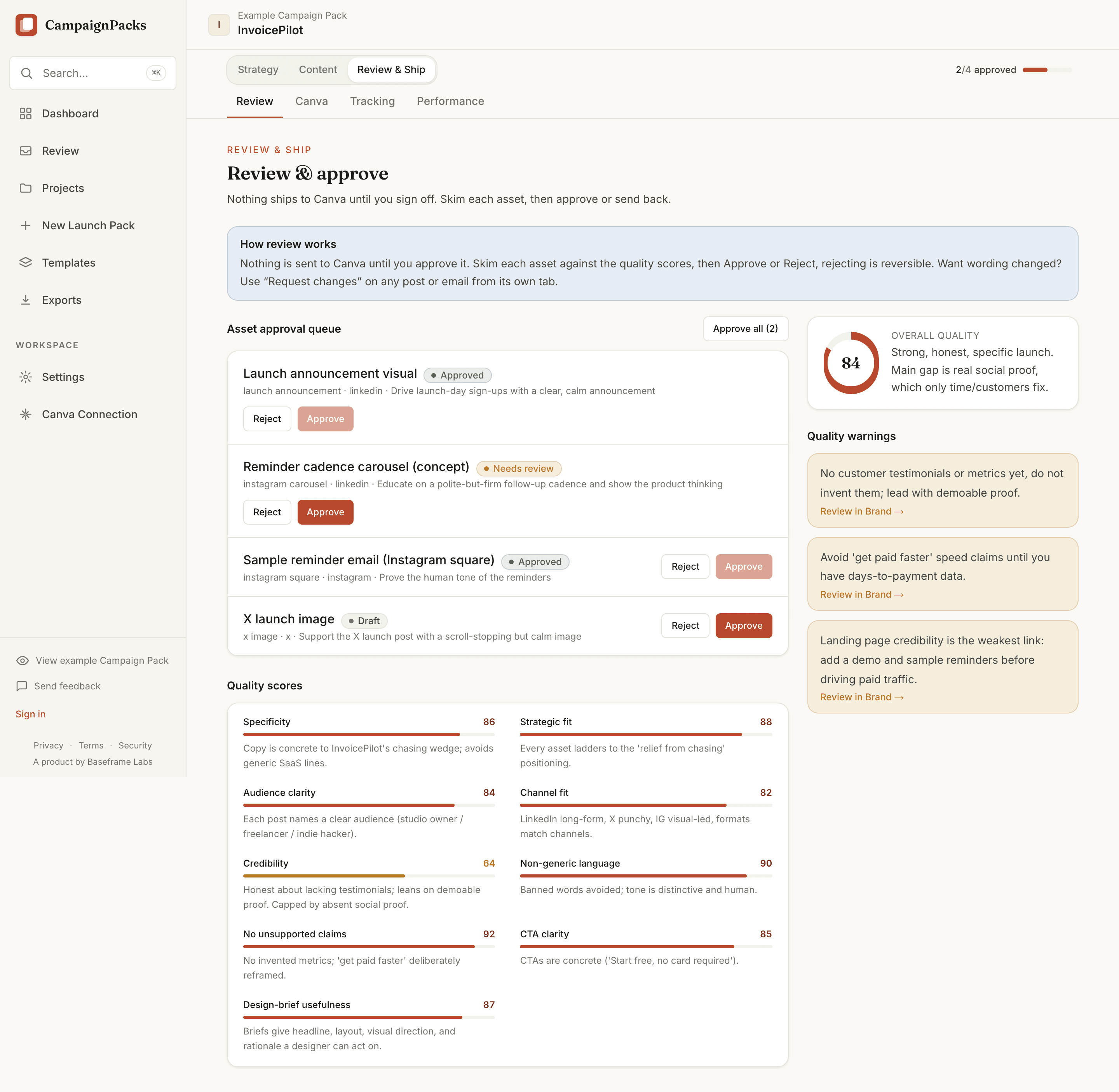
Four assets waiting, one of them flagged
This pack scores 84, with credibility at 64 and a warning saying why. The server checks approval again before anything is created or published, so nothing runs ahead of you.
The trust report
It tells you what it cannot prove.
The trust report names the claims CampaignPacks could not substantiate, so you fix them before a buyer asks where the number came from.
- The promise
- CampaignPacks never invents metrics, testimonials, or customer counts. Where proof is missing, the report says so rather than papering over it.
- Claims, flagged by kind
- It labels each shaky line missing proof, vague, or weak, with the reason and a sharper way to say it. Four credibility scores sit above the list.
- A quick action per gap
- Every gap comes with a time estimate, so no testimonials yet reads as a twenty-minute job.
- Proof cited to its source
- It lists the evidence it found and cites each item back to where it came from, marking anything uncited.
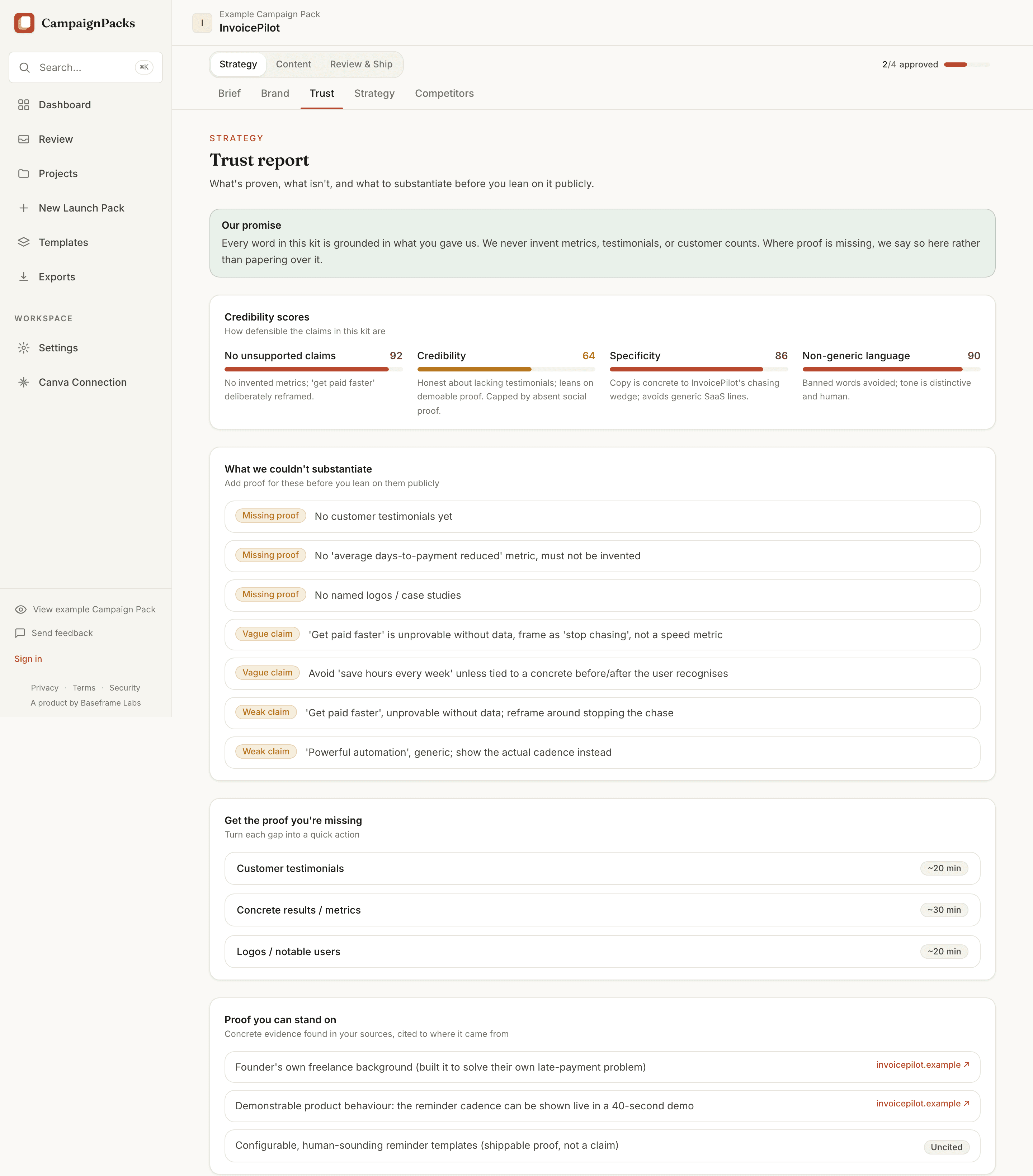
What is proven, what is not, and what to fix first
It separates the claims you can stand on from the ones you cannot, then gives you the shortest path to closing each gap.
The Campaign Board
Seventeen sections, three phases.
One Campaign Board holds the whole engagement, grouped the way the work happens: Strategy, then Content, then Review & Ship.
- Strategy
- The brief, brand voice, the trust report, positioning and audience, and the competitive teardown. Everything downstream traces back to these.
- Content
- The campaign concept, the 14-day calendar, social posts for LinkedIn, X, and Instagram, and the email launch sequence.
- Review & Ship
- Review and approval, Canva design briefs and creation, conversion tracking, and ad performance once something is live.
- Approval, tracked across the board
- A counter at the top of the board tracks how many assets you have approved, and it follows you into every section.
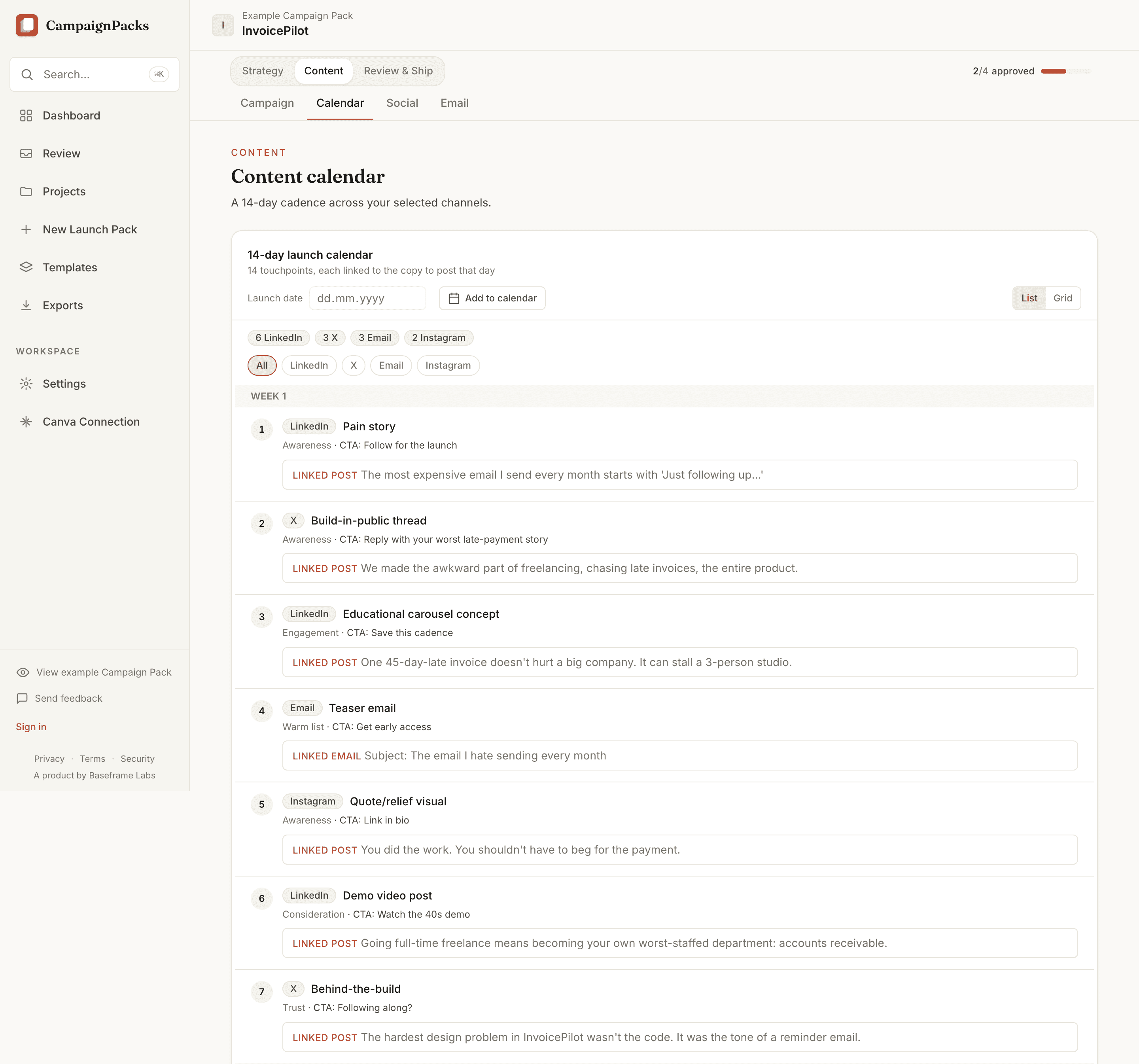
Fourteen touchpoints, each with its copy
Every touchpoint carries its channel, funnel stage, and call to action, and links to the copy written for that day. Export the two weeks as an .ics file and they land in your own calendar.
Export and publish
Take the pack anywhere.
An approved pack leaves in whatever shape the next person needs: a designer, a client, or a spreadsheet.
- Client one-pager
- A print-ready summary of the campaign, with a white-label toggle that hides the CampaignPacks credit when it is going out under your own name.
- Copy-ready text
- A .txt pack of every post and email, grouped by channel, so the copy can be pasted straight into wherever it is going.
- Markdown, JSON, CSV, .ics
- The full pack as Markdown for docs, or as JSON when something downstream reads it. A campaign CSV for spreadsheets, and a calendar file that imports the 14 days into Google Calendar, Apple Calendar, or Outlook.
- Canva and your own Meta accounts
- Approved briefs become Canva designs. Approved posts go to your own Facebook Page or Instagram, and Meta ads are created paused, at a daily budget you confirm first.
Launch with a plan, not a prompt.
Read a complete Campaign Pack in the public example, no signup, then request access to build your own.
More from the studio

ProjScan
ProjScan tells reviewers when to bootstrap, prove, or stop. Review Gate returns one decision; bootstrap is explicit. Local proof, no code upload.
View
AgentLoopKit
The local control plane for low-token, verifiable agent loops. It owns scope, gates, and completion decisions, with a token receipt on every step.
View
AgentFlight
agentflight guard watches local trust while your coding agent works; agentflight finish writes the Review Passport that proves the result.
View