
Keepfolio
Receipts and warranties, kept on your iPhone.
A local household record you can export when you need it.
- Platform
- iPhone (iOS 17+).
- Pricing
- Free download. Keepfolio Pro yearly costs CHF 19.90 / EUR 19.99 with a 7-day free trial for eligible Apple Accounts. Keepfolio Pro lifetime costs CHF 49 / EUR 49.99 as a one-time purchase. Prices in other countries and regions are shown in the App Store before you buy.

Overview
- Category
- Productivity
- Compatibility
- iPhone, iOS 17+
- Language
- English and German
- Text recognition
- English and German
- Price
- Free download, with optional Keepfolio Pro
- Privacy
- On-device, no account
Keepfolio is a place on your iPhone for receipts, warranty dates, and the photos that go with them. Capture a page, import one from Files, or share one in from Mail, Safari or Photos. Search item names, merchants and notes, set a standard warranty reminder, and export a single-item claim pack when you need to show a document.
Text recognition runs on your iPhone, in English and German. Suggested fields, such as a merchant, a date or a total, are offered for you to check. Fields marked "Check this" must be confirmed or edited before saving. Stronger suggestions do not require a separate confirmation. Check recognised amounts and dates against the document before you save. Warranty length presets, including a two-year starting point, are helpers only. They may not match your contract, the seller, or the law that applies to a given item.
There is no Keepfolio account, and there is no Keepfolio server that holds your vault. Keepfolio does not automatically upload receipts, prices, warranty dates or saved photos to Baseframe Labs. You choose whether to export, share or save a backup elsewhere. Apple device backups and other system services follow your Apple settings. The app has no analytics, advertising, or crash-reporting SDK. Visiting this website is separate from using the app. The website privacy policy explains site analytics and email updates.
Walkthrough
How it works.
- 01
Capture or share a receipt.
Photograph a receipt or a serial sticker, import a file, or share one in from Mail, Safari, Files or Photos. Imported PDF and image files are retained. Camera and photo-library captures can be resized and stored as JPEG pages.
- 02
Check what was recognised.
On-device text recognition can suggest a merchant, a purchase date or a total. Review the suggestions and confirm or edit fields marked "Check this". Choose a warranty preset or enter an end date yourself.
- 03
Find it when you need it.
Search item names, merchants and notes, set a standard reminder, back up your records, or export a single-item claim pack. Keepfolio Pro adds household reports, Spaces, custom reminders and richer exports.
Features
What it does well.
Your records
02- Capture, import and share.
- Photograph a receipt, import a PDF or image, or use the Share extension from Mail, Safari, Files or Photos. Imported PDF and image files are retained. Camera and photo-library captures can be resized and stored as JPEG pages.
- Text recognition you review.
- On-device OCR can read English and German. Uncertain or conflicting fields are marked "Check this" and must be confirmed or edited before saving.
Warranties
01- Warranty dates and a two-year preset.
- Store warranty start and end dates. Use a two-year preset or enter your own end date. Presets are helpers and do not determine your legal rights.
Everyday use
03- Search, reminders and a claim pack.
- Find an item again, set a standard warranty reminder, and export a single-item claim pack. A plain CSV export stays free.
- A backup you control.
- Create a backup of your receipt details and saved photos, then choose where to save it. Restoring a backup puts the data back on your device.
- App lock stays free.
- Use Face ID or your device passcode to lock Keepfolio. iOS handles authentication on this iPhone.
Keepfolio Pro
01- Household reports when you need them.
- Pro unlocks an inventory report for insurance paperwork, a claim support pack, a Hausrat insured-sum check, Spaces, custom reminders, and exports that can include photos and receipts. The current list is shown in the app.
See it in action
A closer look.
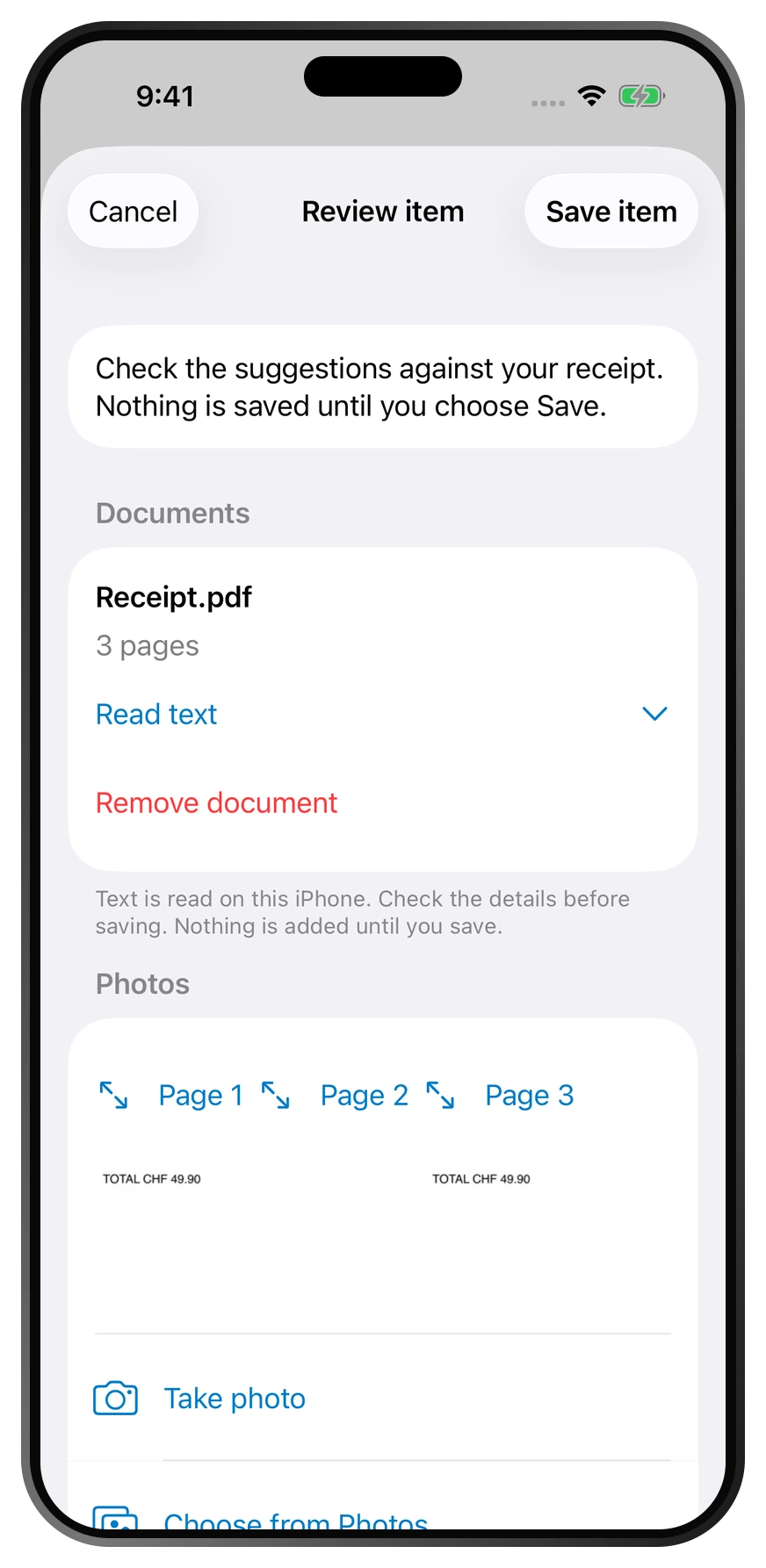
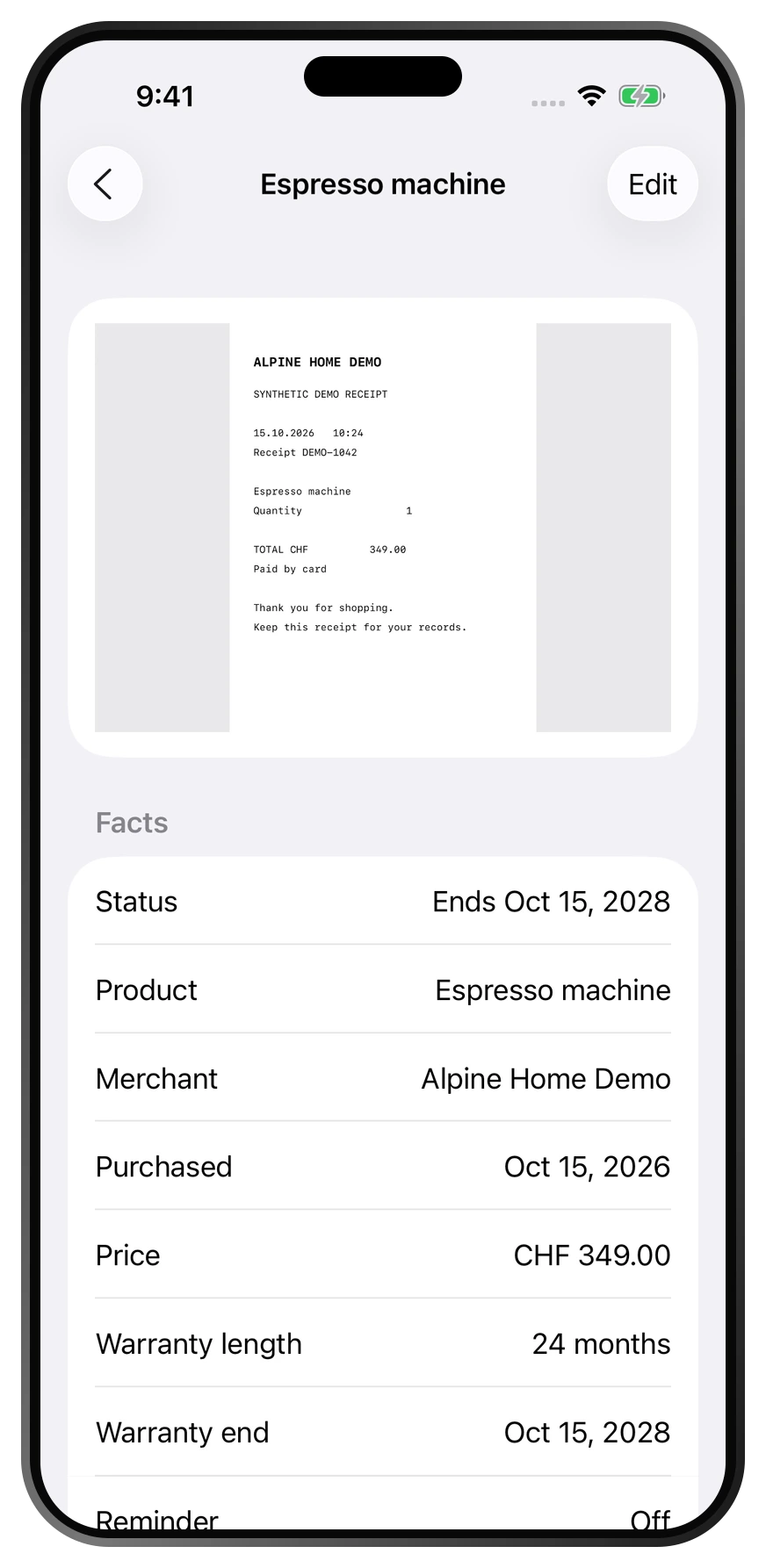
Review a receipt before saving, then find its warranty dates in your household record. Screenshots show example data.
01 / Capture
Review a receipt before saving.
Check the attached pages and recognised text before saving your item. Review suggestions and confirm or edit any field marked "Check this".
02 / Your record
Find a warranty when you need it.
Open an item to see its dates, notes and pages. Export a single-item claim pack, or use Keepfolio Pro for a household report.
Compare workflows
Choose how you keep the record.
Keepfolio vs a photo album.
A camera roll keeps pictures. Keepfolio keeps the receipt, the warranty date and the file together, with item names, merchants and notes you can search, a reminder you can set, and an export you can hand to someone else.
Keepfolio vs Notes.
Notes is fine for a quick line of text. Keepfolio is built for receipts and warranties: pages, recognised fields you review, backup and restore, and a claim pack when you need a document in one place.
Keepfolio vs a spreadsheet.
Keepfolio combines item details, receipt pages and warranty dates in a dedicated iPhone app, with on-device text recognition and exports. Choose it when you want a receipt workflow alongside your household list.
Questions and answers
Keepfolio FAQ
- Does Keepfolio need an account?
- No. There is no Keepfolio account, and there is no Keepfolio server that holds your vault. Keepfolio does not automatically upload your receipts or photos to Baseframe Labs. You control exports, sharing and backups you save elsewhere. Apple device backups follow your Apple settings.
- Where does text recognition run?
- On your iPhone. It can read English and German, and it can detect the language automatically. Fields marked "Check this" require confirmation or editing before you save. Stronger suggestions do not require a separate confirmation. Check recognised amounts and dates against your document.
- What is free, and what is Keepfolio Pro?
- The free app includes capture and import, on-device text recognition, search, standard reminders, a single-item claim pack, backup and restore, plain CSV export, and Face ID or passcode app lock. Keepfolio Pro includes an inventory report, a claim support pack, a Hausrat check, Spaces, custom reminders and rich export.
- How will Keepfolio Pro purchases work?
- Keepfolio is a free download with optional Pro purchases through Apple. Keepfolio Pro yearly costs CHF 19.90 / EUR 19.99 with a 7-day free trial for eligible Apple Accounts. Keepfolio Pro lifetime costs CHF 49 / EUR 49.99 as a one-time purchase. There is no monthly plan. Prices in other countries and regions are shown in the App Store before you buy.
- Can I back up and move to another iPhone?
- Yes. You can create a backup and choose where to save it, then restore it on the same device or another iPhone. Backup files are not password protected. Keep them somewhere you trust. Restoring a backup does not, by itself, turn on notifications.
- Will an insurer or a seller accept a Keepfolio report?
- We do not promise that. Keepfolio helps you keep records and, with Pro, produce reports for your own paperwork. It does not provide legal, tax, insurance or professional advice. Check what the other party needs.
- Does it work on iPad or Android?
- The first release is iPhone only, on iOS 17 or later. The interface is available in English and German. Android is not part of this launch.
- Do you collect analytics from the app?
- No. The app has no analytics, advertising or crash-reporting SDK, and it does not use the app to track your activity. This website is separate and has its own privacy policy.
Your receipts, ready when you need them.
Coming to the App Store. Keepfolio stays on your iPhone, with no account and no Keepfolio server for your vault.
More from the studio

Nightmark
Understand recorded sleep, browse your history and see the context behind tonight's suggested bedtime. On-device analysis. No account required.
View
Swiss Auto Data
A free public view of Swiss vehicle registrations, EV adoption and cantonal comparisons, using official open data.
View
ProjScan
ProjScan tells reviewers when to bootstrap, prove, or stop. Review Gate returns one decision; bootstrap is explicit. Local proof, no code upload.
View